Historical weather
ExpertThe essentials
Historical weather loads a GRIB from the past: the wind, pressure, gusts, clouds, rain and waves of the ECMWF IFS model at 0.25°, over the area and period of your choice, up to the current day. Back in port, you replay the day you have just sailed with the weather it actually had; you can also study a past situation or prepare a race on a known course. The feature requires the Premium subscription and an Internet connection.
- Tap the round orange + button at the bottom right, then “Load historical GRIB”.
- Adjust the area with the handles of the rectangle, then tap “OK” in the “Area selection” banner.
- In the “Historical weather” window, choose the “Start” and the “End” of the period.
- Read what the window announces: days available right away, preparation time, grid spacing used. Then tap “Download…”.
- The archive is displayed on the chart and joins the “GRIBs” tab of the left drawer.
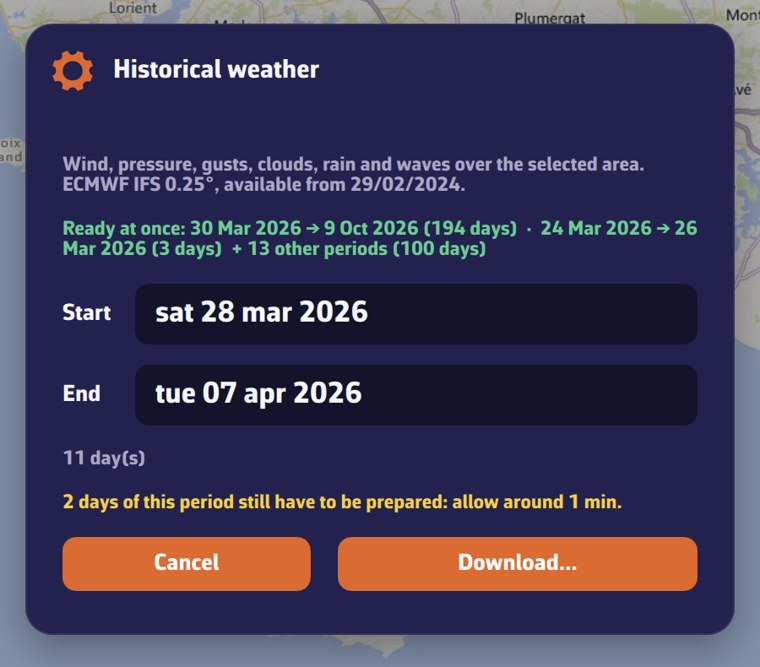 “Historical weather” window on an area of southern Brittany: three-day period, periods ready at once, days to prepare with the estimated time, “Cancel” and “Download…” buttons
Going further
The content of the archive
- Model: ECMWF IFS, 0.25° grid (about 28 km), with no other choice.
- Parameters: wind, pressure, gusts, cloud cover, rain, and for waves height, direction and period. They are all included.
- Step: 3 hours, that is eight forecast times per day, from 00:00 to 21:00 UTC.
- Period: from 1 to 365 days, from February 29, 2024 (start of the archive) up to today. The current day is reconstructed from the runs already published, which lets you replay the day’s passage as soon as you are back in port.
When the window opens, the period runs from yesterday to today. When you choose a start, the end is set ten days later (without going beyond today) as long as you have not chosen the end yourself. An invalid period is flagged under the dates.
The area is that of the rectangle you drew. A very small area is automatically widened to at least one degree.
Days ready and preparation time
Our servers build the archive day by day and keep those that have already been requested. When the window opens, it asks them which ones are ready:
- “Ready at once:” lists the periods that are already ready;
- if your whole period is, “This period is ready: immediate download.”;
- otherwise, the window announces how many days remain to be prepared and the time to allow: “… days of this period still have to be prepared: allow around … min.”
During preparation, a progress bar shows the “Estimated time remaining”, then “A little more patience…” if the estimate is exceeded. The window polls the server every 20 seconds. If it is still not finished, it invites you to try again in a few minutes: the days already built are kept.
Reduced grid for large areas
The larger the area and the period, the heavier the file. The window estimates its size before the download:
- beyond 40 MB, a checkbox offers a coarser grid, in the form “Reduce to 0.5°: … MB instead of … MB”. It is ticked by default; untick it to keep the fine grid;
- beyond 100 MB, the grid is widened automatically (0.5°, then 1°): “Wide area: the grid is reduced to…”;
- if the file still exceeds 100 MB at 1°, the request is refused: shorten the period or reduce the area.
Where to find the archive
The archive is displayed on the chart as soon as it arrives (“Historical weather loaded”). In the “GRIBs” tab, it is called “ECMWF IFS 0.25° archive · start → end” (0.5° or 1° if the grid was reduced), with the label “Historical”. It can be renamed, exported and deleted like other GRIBs, and is read with the meteogram. There is no new run to wait for.
With an archive displayed, the timeline covers its period. The rain radar and the current atlas, which only deal with today, no longer stretch it to today’s date once the archive ended more than two days ago.
Synchronization and reuse
An archive requested by hand enters the GRIB list of your account: your other devices see it, marked “Missing”, and fetch it with the download button on its row or with “Refresh”. This second download does not require a Premium subscription.
A request identical to an archive already on the device is served without a connection. On the device, an archive file is deleted after seven days without use.
The archives that NavimetriX loads by itself to replay a track do not appear in the list and disappear with the track. See Tracks, replay and logbook.
Without a Premium subscription
The “Load historical GRIB” menu remains visible, but the request is refused at download time: “Historical weather requires a premium subscription.”