Anchor alarm
BeginnerThe essentials
The anchor alarm draws a swinging zone around the anchor, that is, the space in which the boat swings around her anchor with the wind and current. If the boat leaves it, she is dragging: the alarm sounds, and can send an SMS. The anchor alarm requires the Premium subscription and a GPS position.
- With the boat anchored and almost stopped (speed over ground below 2 knots), tap the round “+” button at the bottom right of the chart, then “Drop anchor”. Navigation mode turns on if it was not already on.
- The anchor is placed ahead of the bow, an “Anchorage DD/MM hh:mm” POI is created and a banner appears at the top of the chart: “Anchor set Alarm not armed”.
- Choose “Circle” or “Hexagon” in the banner, then adjust the zone by dragging the green handle.
- Hold the banner’s “Arm” button: it then shows “Watching”.
- When leaving, hold “Disarm”, then “Raise anchor”.
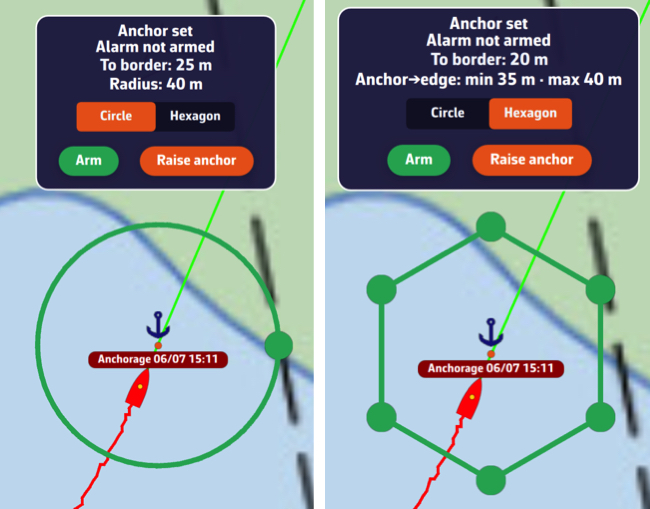 The anchor banner and the swinging zone, as a circle on the left and a hexagon on the right
Going further
Conditions for dropping anchor
All conditions are checked when you tap “Drop anchor”, and a message says what is missing:
- without a Premium subscription, the subscription window opens;
- Navigation mode is turned on automatically (message “Navigation Mode enabled for the anchor watch”), then NavimetriX waits up to 6 seconds for a first GPS position. An approximate position, deduced from the Internet connection, is not enough;
- speed over ground must be below 2 knots: above that, the boat is still making way.
One anchor at a time: as long as an anchor is down, “Drop anchor” disappears from the “+” menu.
The anchor is placed ahead of the boat, at the distance set in “Drop ahead of bow” (15 m by default), along the compass heading or, failing that, the course over ground. With neither, it is placed at the boat’s position. The zone is created with the default radius and shape, and the chart zooms to frame it.
The swinging zone
- Circle: a single radius around the anchor. Drag the green handle on the circle: the radius ranges from 5 to 500 m and is shown live in the banner. Set it to the length of chain paid out, plus a margin, taking the tide into account.
- Hexagon: six vertices that you move one by one, to fit an anchorage that is crowded on one side.
Changing shape in the banner redraws a new zone, at the default radius.
Once the alarm is armed, the zone is locked and the handles disappear: an accidental gesture cannot enlarge it. To adjust it without disarming (paying out more chain in the middle of the night, for example), tap the anchor on the chart then “Edit radius” (circle) or “Edit watch zone” (hexagon). The handle reappears for the time of an adjustment and disappears by itself after 20 seconds.
To move the anchor, with the alarm not armed, tap it then choose “Move anchor” and drag it: the zone follows. With the alarm armed, this entry disappears, and so does “Delete POI”, so as not to leave the alarm watching a zone with no center.
The banner
Below the alarm status (“Anchor set Alarm not armed”, “Watching” in green, “DRAGGING” in red), the banner shows:
- the distance to the edge of the zone (“To border: 12 m”), or how far the boat has gone out of it (“Outside zone: 8 m”); “Waiting for GPS…” without a position;
- the circle’s radius (“Radius: 40 m”) or, for a hexagon, the minimum and maximum distances between the anchor and the edge;
- the distance and true bearing of the anchor as seen from the boat (“Anchor: 28 m at 145°”);
- the bearing of the anchor from the bow: “30° to port” in red, “30° to starboard” in green, “0° ahead” or “180° astern”. This line only appears if a compass heading or a course over ground is available.
Drag the banner wherever you like on the chart: its position is remembered on the device. During a man overboard alert, it steps aside for the MOB banner, without the watch stopping.
Arming and disarming
- In the banner, hold “Arm” or “Disarm” for about a second: an outline is drawn around the button, then a message confirms. A short tap only reminds you “Hold to arm / disarm”.
- You can also tap the anchor on the chart and choose “Arm anchor alarm” or “Disarm anchor alarm”.
The armed state is specific to each device: arming the alarm on the boat’s tablet does not arm the phone left in a pocket. The settings (radius, shape, delay, sound, SMS), on the other hand, are shared by all devices on the account.
The alarm only watches in Navigation mode. Arming the alarm turns this mode on, and turning off Navigation mode with an armed alarm asks for confirmation, then disarms the alarm. If the Premium subscription ends during an anchorage, the siren continues to protect the watch in progress: only creating an anchorage is reserved for Premium.
Dragging
When the boat leaves the zone and stays out for the “Delay” (30 s by default), the alarm goes off: the chosen sound (siren by default), the voice “Anchor Drag Alarm, the boat is dragging”, the window “Anchor Drag Alarm: boat is 52 m from anchor (limit 40 m)” and the banner in “DRAGGING”. The alarm keeps sounding even if the boat returns to the zone, until you acknowledge it. Once acknowledged and the boat is back in the zone, it re-arms for a new drag. Only a real GPS position is taken into account.
Settings
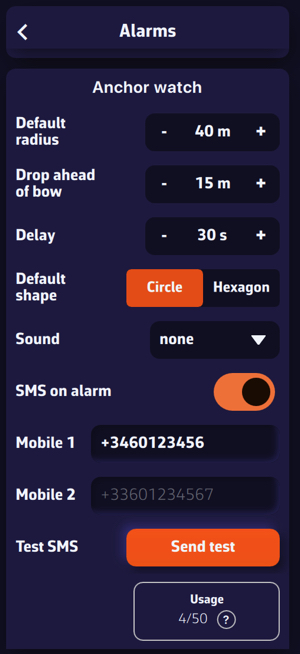 Settings, Alarms, Anchor watch section
They are in Settings > Alarms, “Anchor watch” section:
- “Default radius”: 40 m (from 5 to 500 m);
- “Drop ahead of bow”: 15 m (from 0 to 100 m);
- “Delay”: time spent outside the zone before the alarm, 30 s (from 0 to 300 s; set to 0 s, it counts as 30 s);
- “Default shape”: “Circle” (default) or “Hexagon”;
- “Sound”: siren by default; “none” also gives the siren.
The SMS alert
In addition to the onboard siren, NavimetriX can warn one or two phones by SMS. In the same section:
- Turn on “SMS on alarm”.
- Enter the numbers in “Mobile 1” and “Mobile 2”, in international format (for example +33612345678).
- Check with “Test SMS” and the “Send test” button: a real SMS is sent immediately.
The SMS alert requires the Premium subscription, a signed-in NavimetriX account and an Internet connection on board. The SMS gives the boat’s position, its bearing and distance from the anchor, and a Google Maps link to the boat. At most three SMS are sent per drag: immediately, then 30 and 60 minutes later, as long as the alarm is not acknowledged. Acknowledging the alarm stops the sending. With no network at the time of the alarm, sending is retried every 5 minutes.
The “Usage” counter shows the SMS used from the annual allowance: 50 SMS per rolling 365-day period. The “?” button details the count. Once the allowance is used up, the app displays “Annual SMS limit reached”; the onboard siren, however, keeps working. Numbers starting with +1 (United States, Canada) are not served, and a warning line says so below the numbers.
Monitoring the boat remotely: “At anchor”
As long as an anchor is down, the boat’s device (in Navigation mode, with a signed-in NavimetriX account) publishes the boat’s position every 20 seconds, with the anchor and the swinging zone. On the other devices on the same account, an “At anchor” row appears by itself at the top of the Tracks tab of the left drawer. The chart then shows, read-only:
- the boat’s orange track over the last three hours (swinging, any dragging);
- the anchor and the swinging zone;
- the boat’s last known position, oriented along her heading.
The round boat button, at the bottom right of the chart, recenters the view on the boat at anchor; a long press frames the whole swinging zone. If the boat’s device goes silent (app closed, no more Internet), its last position stays displayed for up to 12 hours. The row disappears when the anchor is raised or when Navigation mode is turned off on board.
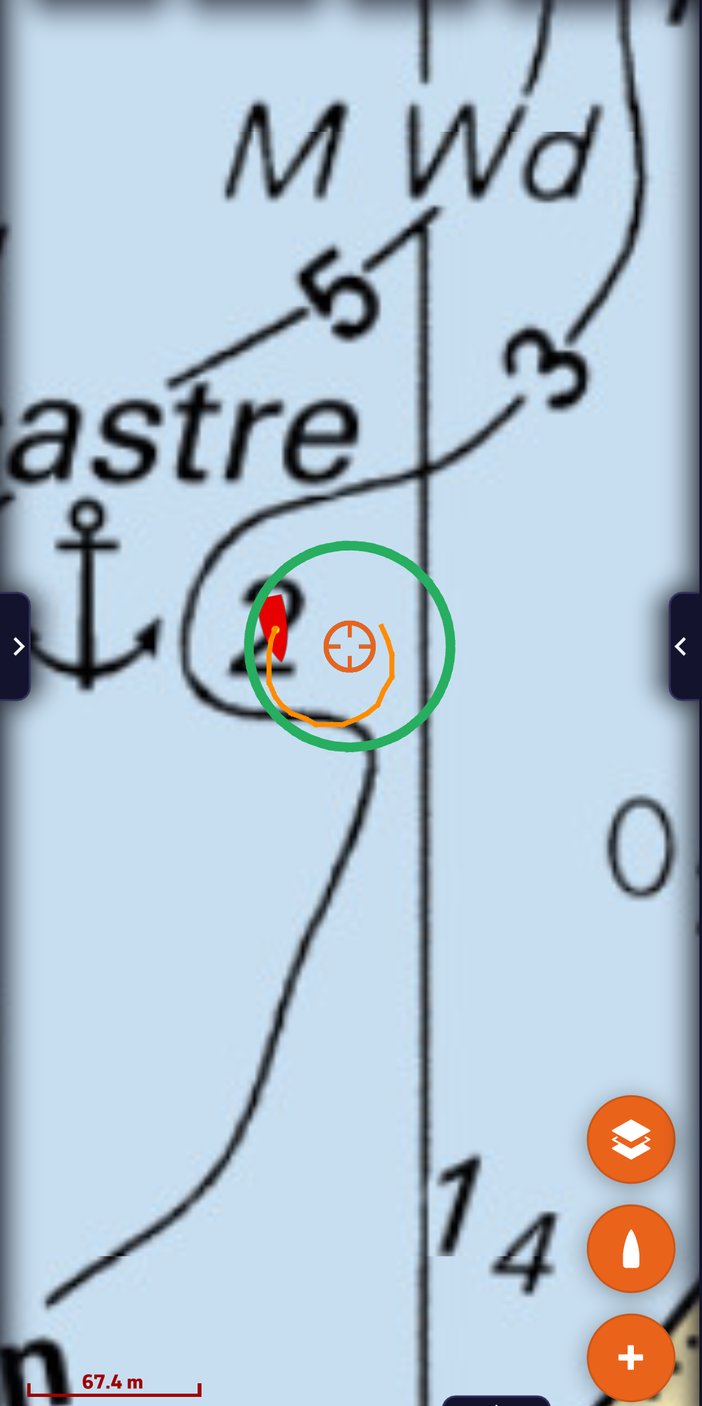 Second device on the account (phone): the boat at anchor is shown on the chart with its orange track, the green ring of the swinging area and the boat icon oriented along her heading
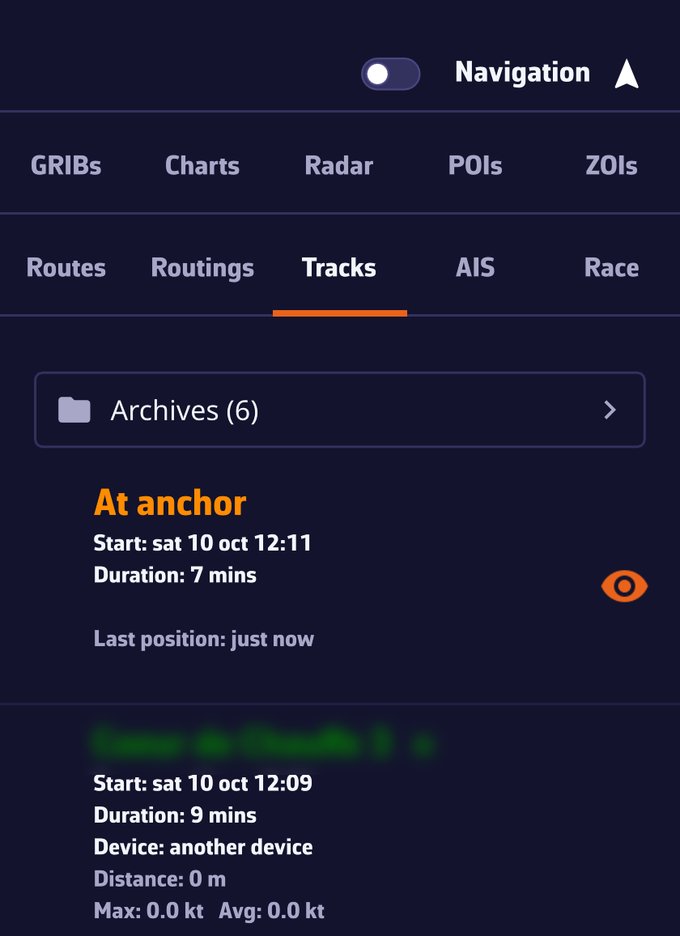 Tracks tab of the left drawer on the second device: the “At anchor” row at the top, with the start time, the duration and “Last position: just now”
Raising the anchor
Hold “Raise anchor” in the banner (this button only appears with the alarm disarmed), or tap the anchor on the chart and choose “Raise anchor”, which disarms at the same time. The swinging zone disappears, the “At anchor” row vanishes on the other devices, and the anchorage POI stays on the chart as a memento of the stopover.