Navigation alarms
BeginnerThe essentials
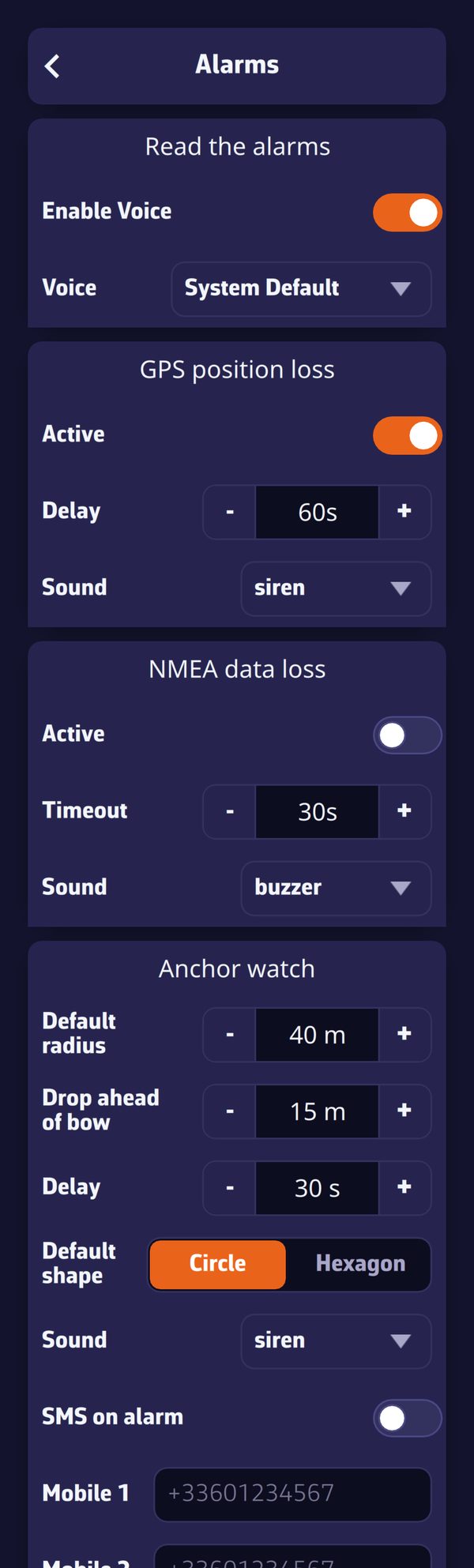 The Settings page, Alarms: voice reading, GPS position loss, NMEA data loss, anchor watch
NavimetriX monitors the boat’s data and warns you as soon as a value goes outside the limits you have set: GPS position lost, depth shoaling, wind rising, a vessel on a collision course… Each alarm opens a window, plays a sound and can read its message aloud, until you acknowledge it.
Alarms only watch in Navigation mode (“Navigation” switch at the top of the left drawer), reserved for the Premium subscription. Only the NMEA data loss alarm also runs outside this mode.
- Open Settings (“‹” handle at the right edge of the screen), then “Alarms”.
- In the section of the alarm you want, turn on the “Active” switch.
- Set the threshold, the duration and the “Sound”.
- Switch to Navigation mode.
- When the alarm sounds, tap “Acknowledge”: the sound stops, and the alarm does not trigger again until the situation has returned to normal.
Going further
Voice reading and sounds
The “Read the alarms” section sets the voice:
- “Enable Voice” (on by default): the alarm message is read by the device’s speech synthesis, alternating with the sound, until acknowledged.
- “Voice”: the voice used, “System Default” by default.
These two settings are specific to each device: you can have the chart table tablet speak and keep the phone silent.
Each alarm has its own “Sound”: none, beep1, beep2, beep3, buzzer, diving, fire, foghorn, railroad, rooster, siren or smoke. With “none” and the voice off, the window stays displayed in silence until you acknowledge it. Exception: for heading, wind speed and direction, polar efficiency, cross-track error, depth, dangers ahead and anchor watch, “none” is replaced by a default sound.
The alarms one by one
All are off by default, except GPS position loss. The “Duration” (from 0 to 600 s, 30 s by default; set to 0 s, it counts as 30 s) is the time the condition must last before the alarm sounds: it prevents a gust or a yaw from triggering it.
| Alarm | It sounds when… | Settings and default values |
|---|---|---|
| GPS position loss | the GPS position is lost while you were making way | “Delay” 60 s (15 to 300 s), sound siren |
| NMEA data loss | no more NMEA data is arriving | “Timeout” 30 s (10 to 300 s), sound buzzer |
| Course | the heading leaves the “Course” ± “Tolerance” range | “Source” COG or HDG, “Course” 180°, “Tolerance” 15° (0 to 90°), sound beep1 |
| Wind speed | the wind exceeds the threshold | “Source” TWS or AWS, “Speed” 25 knots (0 to 70), sound beep2 |
| True wind direction | the true wind direction leaves the “Direction” ± “Tolerance” range | “Direction” 180°, “Tolerance” 15°, sound beep3 |
| Polar efficiency | your speed falls below the chosen percentage of the polar speed | “Efficiency” 80% (0 to 100%), sound buzzer |
| Cross-track error | you stray too far from the line of the leg being followed | “XTE” 500 m (0 to 2,000 m), sound buzzer |
| Depth | the depth sounder reads below the threshold | “Depth” 10.0 m (0 to 100 m), sound buzzer |
| Chart dangers ahead (C-MAP) | the C-MAP chart reports a danger in the sector ahead of the boat | “Look ahead” 10 min (1 to 60), “Sector half-angle” 15° (2 to 60°), sound buzzer |
| Barometer | the pressure drops or rises too fast | “Drop”, “Rise” or “Both” (Drop), “Change” 3.0 hPa (0.5 to 10), “Over” 3 h (1 to 6 h), sound buzzer |
| AIS | a vessel will pass too close, too soon | “Alarm if CPA less than” 0.5 mile (0 to 20), “Alarm if TCPA less than” 10 min (0 to 60), sound diving |
| Alarm 1 to 5 | the chosen quantity goes above or below the threshold | “Parameter”, “Condition”, “Threshold”, “Duration” |
A few details, read from the code:
- GPS position loss: so as not to cry wolf, it only sounds if the device had a GPS position for at least 30 seconds, the boat was moving at more than one knot in the minute before the loss, and the loss lasts the chosen “Delay”. It clears by itself when the position returns.
- NMEA data loss: NMEA is the format of the data sent by the boat’s instruments (GPS, log, wind vane, depth sounder, AIS). The alarm only sounds if data had already arrived and then fell silent. With several NMEA links, each is monitored: it is enough for one to go silent. It requires an active NMEA connection.
- Course: COG is the course over ground (given by the GPS), HDG the compass heading. Like polar efficiency and cross-track error, this alarm only plays with a real GPS position and a speed over ground of at least 0.2 knots.
- Wind: TWS is the true wind speed, AWS the apparent wind speed. These alarms require an anemometer connected over NMEA.
- Polar efficiency: this is the ratio between your speed through water and the one the boat’s polar predicts for the current wind (see Polars and Sailchart).
- Cross-track error: the XTE (cross-track error) is the lateral distance between the boat and the line of the leg being followed. A route or an active “Goto” is required. The alarm sounds immediately, with no waiting duration, and stays quiet for 20 seconds after each route point change, the time to pick up the new leg. A deviation of more than 5 miles is ignored.
- Depth: it requires a depth sounder connected over NMEA. It sounds immediately and clears as soon as the depth is sufficient again.
- Chart dangers ahead (C-MAP): it only exists in versions that include C-MAP and requires a C-MAP chart covering the area. Every 10 seconds, it has a sector placed ahead of the boat checked, centered on the course over ground, of the length you will cover during the “Look ahead” and of the width set by the half-angle. Rocks, wrecks, obstructions, shoals shallower than your draft (plus a 0.5 m margin), bridges and cables lower than your air draft: these two values are set in “My Boat”. Depths are those of the chart, without the tide. The monitored sector is drawn on the chart, in blue when the way is clear and in red as soon as a danger is found. You must be making way at at least 0.5 knots. Without a chart or licence, the alarm stays silent.
- Barometer: it compares the current pressure with the highest (for a drop) or the lowest (for a rise) of the last few hours, in the pressure history. A pressure source is required: a barometer connected over NMEA or the device’s sensor (see Barometer and barograph). A 0.5 hPa margin prevents a pressure hovering around the threshold from sounding twice.
- AIS: the CPA (Closest Point of Approach) is the minimum distance at which a vessel will pass you, the TCPA the time remaining before that point. The alarm sounds when the CPA and the TCPA are both below their thresholds, for at least 15 seconds. The same settings are found in Settings > AIS, where the switch is called “Sound alarm”.
- Alarms 1 to 5: the “Parameter” is chosen from 28 quantities: speed and course over ground, distance, bearing and time to the waypoint, position accuracy, 5 and 20 min SOG, boat speed, heading, true wind speed, angle and direction, apparent wind, VMG, current, depth, water and air temperatures, pressure, speed and VMG efficiencies, waypoint VMC and XTE, distance and time to the layline. The “Condition” is “Above” or “Below” the “Threshold”.
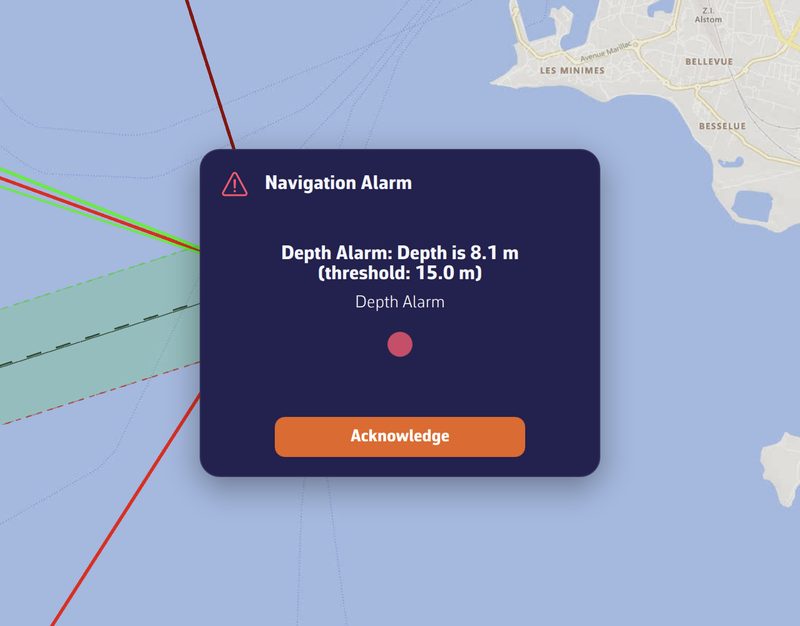 “Navigation Alarm” window: depth alarm message with its measured value, its threshold and the “Acknowledge” button
Acknowledging, ignoring, silencing
The alarm window shows the message (measured value and threshold), the alarm type and a flashing red indicator.
- “Acknowledge” stops the sound and the voice. An alarm with a duration only re-arms once the situation has returned to normal for the same duration; cross-track error and depth re-arm as soon as the value goes back to the right side of the threshold. Two triggerings of the same alarm are separated by at least 10 seconds (30 seconds for dangers ahead).
- The window closes by itself when the condition disappears, except for AIS and MOB alarms, which always wait for your action.
- For an AIS alarm, three buttons: “OK” acknowledges that vessel; “Ignore From Now” no longer sounds for it as long as it stays in the AIS target list; “Silence All”, which only appears from three pending AIS alarms (a crowded race start, for example), disables the AIS collision alarm. You then have to re-enable it in Settings.
When alarms go quiet
- Outside Navigation mode, no alarm watches, except NMEA data loss.
- When the device is following another boat through the Remote cockpit (“Follow” position), or is replaying a recorded or shared outing, all alarms are off: it is only an observer.
- In power-saving mode, conditions are checked once per second instead of twice.
- In the version of NavimetriX that opens in a browser, the “Alarms” page does not exist: a browser tab sent to the background no longer watches.