Best start
ExpertThe essentials
Leaving a few hours earlier or later can shorten a passage significantly. The best start search calculates the same routing for several start times and keeps the fastest.
- Open the “Routing” window (“+” button, “Calculate Routing”) and set your GRIBs and your route as usual.
- In “Start”, set the date and time of the first start to try.
- Turn on “Best start”.
- Set the “Window” (over how many hours to search) and the “Step” (the interval between two starts tried).
- Tap “Calc Routing”.
At the end, the fastest routing is displayed on the chart and a table compares all the starts tried.
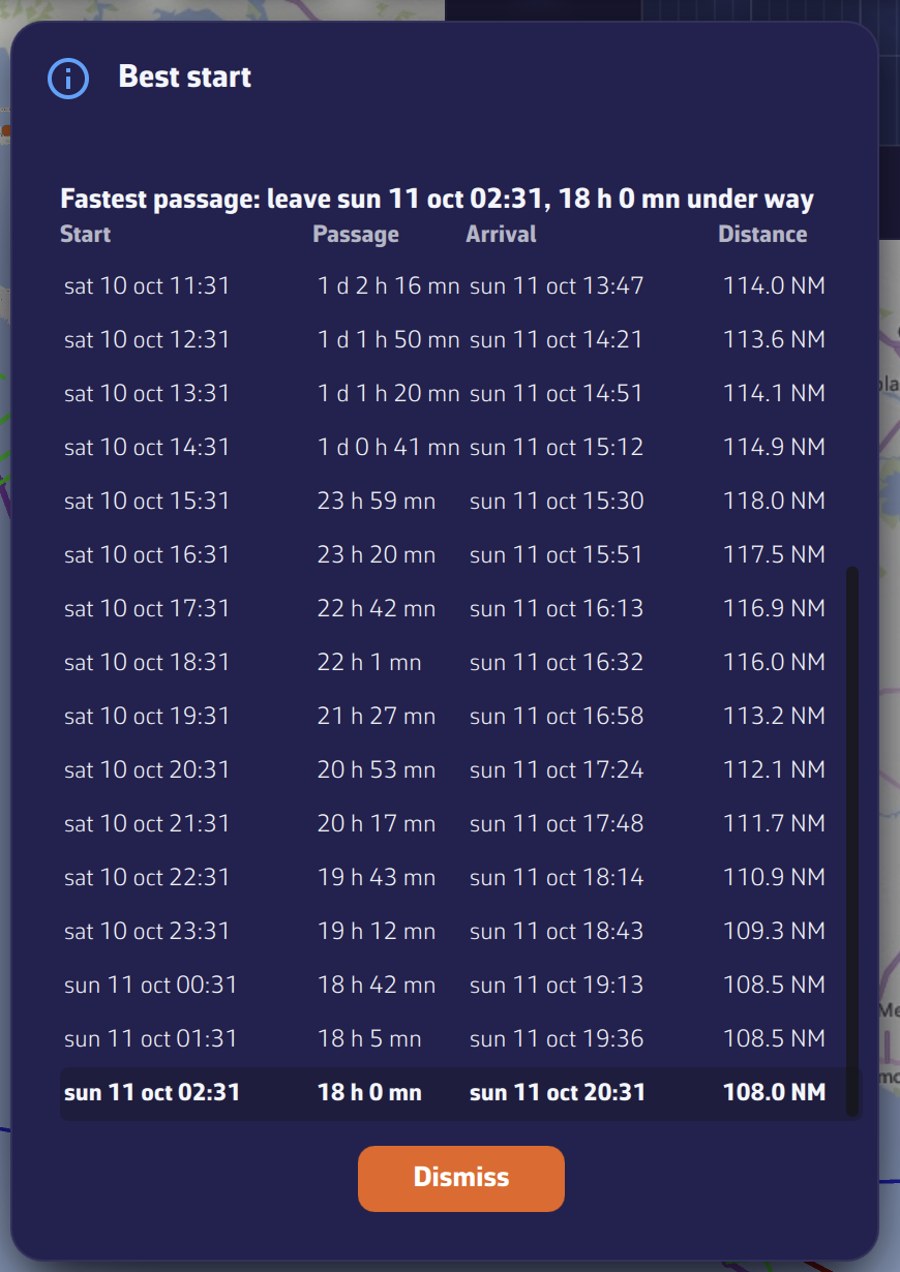 The “Best start” window at the end of the search: the fastest passage at the top, then the table of starts tried with the fastest in bold
Going further
The settings
| Setting | Values | Default |
|---|---|---|
| “Best start” | yes or no | no |
| “Window” | 1 to 120 h | 24 h |
| “Step” | 15 to 360 min, in steps of 15 | 60 min |
“Best start” runs a complete routing for each possible start time, from the chosen time to that time plus the window, every “Step”. By default, that makes 25 routings (24 hours, one per hour, both ends included: from the chosen time to the same time the next day). The number of starts is limited to 200; beyond that, the end of the window is not tried.
The switch stays in the position you chose for the following routings: remember to turn it off to return to a simple routing.
With “Now from my position”, the first start is the current time and each trial starts from the boat’s position.
During the search
Each start is calculated without being displayed. A panel, at the bottom right, tracks progress:
- “Best start”;
- “Start 3/25” followed by the date and time of the start in progress;
- a progress bar;
- the number of starts completed and the fastest passage found so far (“fastest so far …”).
The “Cancel routing” button, at the top of the chart, stops the search: the message “Best start search cancelled” is displayed and no routing is kept.
The search takes roughly the time of one routing multiplied by the number of starts: widen the step for a first search, then narrow it around the best slot.
The result
When all the starts are calculated, the fastest becomes the saved routing, with no new calculation, and the “Best start” window opens:
- at the top, “Fastest passage: leave …, … under way”;
- a table with one row per start tried: “Start”, “Passage” (the duration), “Arrival” and “Distance”;
- the fastest row is highlighted, and the table opens centred on it;
- a start whose routing does not reach the finish shows “—” and “not reached”.
If no start in the window reaches the destination, only the message “Best start: no start in the window reaches the destination” is displayed.
What is not covered
The search does not apply:
- to a routing from a pivot point, which necessarily starts at the time of its point;
- to “Route to this point” and “Route to the target” routings, and to the recalculation of a routing to a point, which start now.
Each start must fall within the wind GRIB’s period. If the window goes past the end of the forecast, the last starts do not reach the finish.