Route a competitor
ExpertThe essentials
A competitor of the race can be routed like your own boat: from its position, along the route of the race, with a polar that matches it. You see the route it should follow, and during a replay, what a routing would have advised it at a given moment of the race.
- In Settings > Race tracking, “Rankings” section, choose the route of the race: the routing follows it.
- In the “Polars” section, tap “Choose” next to the boat’s class and choose a polar.
- In the “Race” tab of the left drawer, open the ⋮ menu of the boat and tap “Route this boat”. On the chart, a long press on the boat (a right-click on a computer) opens the same menu.
- The “Routing” dialog opens on this boat: check the wind, then tap “Calc Routing”.
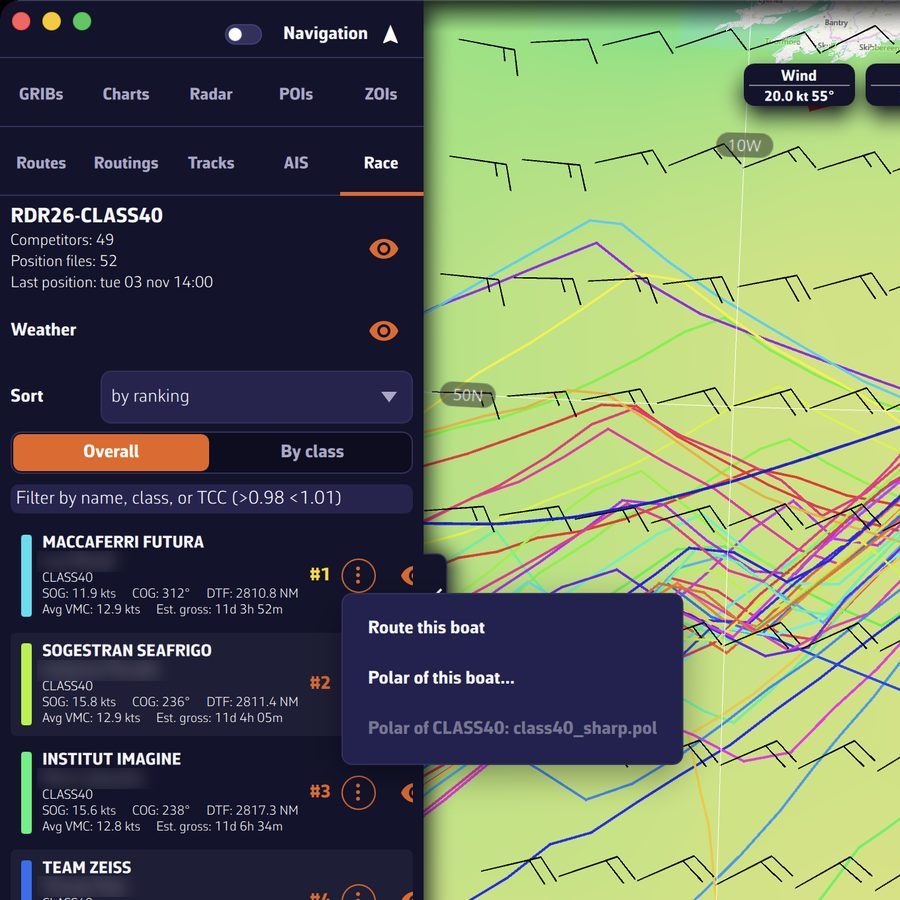 Race tab, ⋮ menu of a boat open: “Route this boat”, “Polar of this boat…”, polar used shown greyed; skipper names blurred
Going further
A competitor’s polar
The race file contains no polar: you choose it, at two levels.
- By class, in the “Polars” section of Settings > Race tracking: one row per class of the race file (CLASS40, IMOCA, OCEAN50…), with a “Choose” button. No polar is chosen in advance. The polar of a class is used for all the boats of the class that have none of their own.
- By boat, with “Polar of this boat…” in its ⋮ menu. It takes precedence over the class one. “Use the polar of its class”, which then appears in the same menu, removes it.
Both open the polars window of “My Boat”, with the library, your imported polars and the search for ORC certificates (see Polars). The choice does not touch the polar of your boat. The choices are saved with the race.
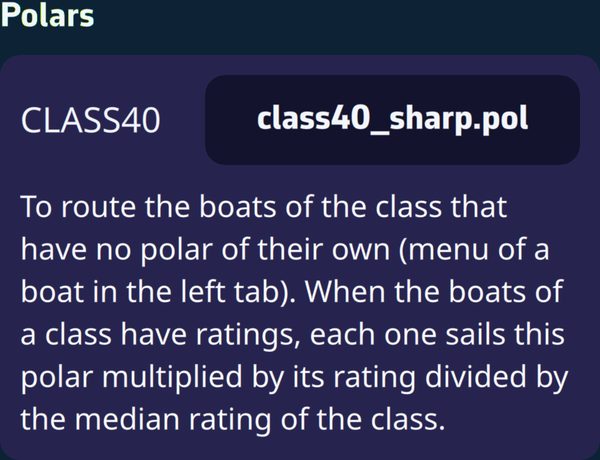 Settings > Race tracking, “Polars” section: CLASS40 row with its polar, and the explanatory text below
The rating. In a corrected-time race, the corrected time is the race time multiplied by the rating (the TCC). Two boats tied on corrected time therefore sail at speeds in the ratio of their ratings. NavimetriX uses this to adapt the polar of a class to each boat: it considers that the polar represents the median boat of the class, and multiplies the speeds by the boat’s rating divided by the median rating of the class, between 0.8 and 1.2. A class without a rating, such as a one-design class, keeps its polar as it is. A polar chosen for a boat is never multiplied. The last row of the ⋮ menu shows the polar that will be used, for example “Polar of CLASS40: class40_sharp.pol × 1.012”.
The start and the finish
- The start is the position of the boat at the time of the timeline cursor. During a replay, it is therefore where the boat was at that moment. If the cursor is beyond the last position received for the boat, or at the current time, the start is its last position, at the time of that report.
- The finish follows the route of the race: the routing goes to the next mark the boat has to pass, then to the following points of the route up to the finish.
A boat that has finished cannot be routed.
The Routing dialog
The dialog opens on the boat:
- “Departure” shows a fixed line, for example “TEAM ZEISS, from its position of 3 Nov 14:00”;
- “Route” shows the route of the race and its destination, for example “RDR 2026, to Cabrits”;
- “Wind”: when the “Weather” eye of the Race tab is on, the race weather is preselected. It is the only file that covers the past of the race: without it, a start in the past is refused. Ensemble models are not offered;
- “Current”, “Waves” and “Other settings” are your usual settings, except the “Polar” row, which shows the polar of the boat.
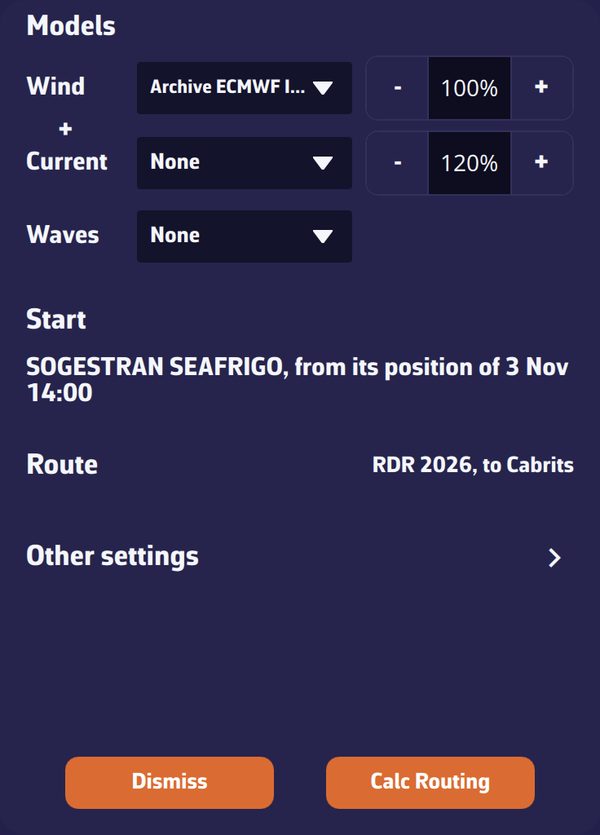 “Routing” dialog open for a competitor: Wind on the ECMWF archive of the race, Departure “…, from its position of …”, Route “RDR 2026, to Cabrits”
The settings you change in this dialog (polar efficiency, limit angles, penalties, maximum duration…) are yours: they will also apply to your next routings.
The result
The routing bears the name of the boat followed by the wind model, for example “TEAM ZEISS - ECMWF IFS 0.5°”, and takes the colour of the boat. It is filed in the Routings tab with the others, and studied in the same way (see Routing). During a replay, move the timeline forward: the boat follows its real track, and you see where it departs from the calculated route.
- “Routing from this point” on a point of the routing keeps the polar of the boat.
- “Recalculate” is not offered: the menu shows it greyed out, with the reason “routing of a race boat”.
If the routing does not start
- “No polar for …”: choose a polar for its class or for the boat.
- “Choose the route of the race in Race tracking first”: the “Rankings” section has no route.
- “The finish of the race route, …, is outside the area of the … wind GRIB…”: the chosen GRIB does not cover the whole route. Switch the “Weather” eye on, or choose a wider GRIB.
- “Cannot start routing: the departure date/time (…) is outside the forecast period…”: the GRIB does not cover the start time, which happens with a forecast and a start in the past. Switch the “Weather” eye on.