Remote Cockpit
ExpertThe essentials
The remote cockpit sends the onboard data, NMEA and AIS, over the Internet from one device to another. The device left ashore then shows what the boat’s device sees: position, instruments, AIS targets, track. Both devices must be connected to the same NavimetriX account: there is nothing else to pair. Broadcasting requires the Premium subscription.
- On the onboard device, open the Settings (“‹” handle on the right edge), then “GPS & NMEA”. At the very bottom of the page, in the “Remote cockpit” section, choose “Broadcast”.
- On the device ashore, in the same place, choose “Follow”.
- The device that follows switches to Navigation mode by itself and centres the chart on the boat as soon as the first position is received.
- To stop, set the setting back to “Off” on each of the devices.
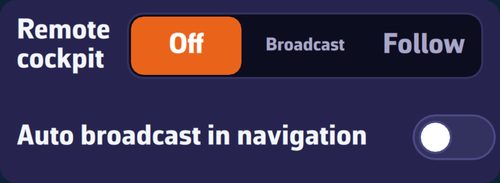 “Remote cockpit” section of the Settings, GPS & NMEA page: “Off / Broadcast / Follow” selector and “Auto broadcast in navigation” switch
Going further
The settings
The “Remote cockpit” section has two lines, specific to each device:
- “Remote cockpit”: “Off” (default), “Broadcast” or “Follow”. A device broadcasts or follows, never both at once.
- “Auto broadcast in navigation” (off by default): the device broadcasts as soon as Navigation mode is turned on and stops when it is turned off, going back to its previous setting. As long as this option is ticked, the selector above is greyed out: Navigation mode controls it.
Onboard: the device that broadcasts
The broadcasting device sends what it receives from the onboard instruments, at most one NMEA sentence of each type per second. If it has no external GPS, it sends the position of its own GPS. It also relays the AIS targets picked up by the onboard receiver, but never those received over the Internet.
It needs an Internet connection (coastal 4G, Starlink…) and the Premium subscription. Without coverage, nothing is sent.
Only one device broadcasts per account
All the devices of an account share the same channel: two devices broadcasting at the same time would mix two streams, and the followed boat would jump from one position to another. NavimetriX therefore only allows one broadcaster per account.
- Before its first broadcast after launch, the device asks the account whether another is already broadcasting, and waits up to 5 seconds for an answer.
- If another device is broadcasting, a window names it and offers to transfer the broadcast: “Broadcast here” or “Cancel”. If that other device is under way and this one is not, the window says so clearly: a device left at the pontoon could otherwise cut the broadcast of a boat at sea.
- Refusing turns off broadcasting and automatic broadcasting on this device, so that the question does not come back at each departure.
- The device that loses the broadcast stops and announces it: “Broadcasting has been taken over by another device”, specifying where applicable that its “Auto broadcast in navigation” option has been switched off.
Ashore: the device that follows
When you choose “Follow”:
- the device switches to Navigation mode and recentres the chart on the boat at the first position received;
- its own sources are deliberately turned off: internal GPS and local NMEA connection. Otherwise, its position would mix with that of the followed boat. Your NMEA setting is restored when you set it back to “Off”;
- the instruments, AIS targets and track displayed are those of the followed boat. The device does not record this track: the trip is recorded by the boat itself;
- all alarms are turned off: the following device is only an observer, and a loss of link is not a loss of GPS.
When set back to “Off”, the device leaves Navigation mode, unless an anchor alarm is armed on it (see Anchor alarm).
Watching a trip in progress from the Tracks tab, on a device that is not sailing, also sets the remote cockpit to “Follow” for the duration of the watch, so that the dials are in real time, then restores the previous setting (see Track sync).
What you need to know
- Both devices need the Internet.
- Broadcasting requires Premium on the onboard device.
- To show the boat to people who do not have your account, use a track’s share link instead (see Share a track).