Race Analysis
ExpertThe essentials
With each new position file, the race analysis answers the questions you ask first: who gained, who lost, since the previous ranking, over 12 hours and over 24 hours, where the fleet stands relative to the route, and how the boat you follow is doing. It relies on the position files received and on the race route (see Race tracking).
- In Settings > Race tracking, section “Rankings”, choose the race route and the start time: distances are measured along this route.
- After a download of positions, a banner appears at the top of the chart: “New ranking: positions of 22:00”. Tap “See the analysis”. At any time, “Race analysis”, in the ⋮ menu of the “Race” tab, to the right of the race name, opens the same analysis.
- Choose your reference boat in the “Reference boat” tab: your own boat, or the one you follow.
- Go through the three tabs “Summary”, “Ranking” and “Reference boat”, then “Export as PDF” to keep or share the report.
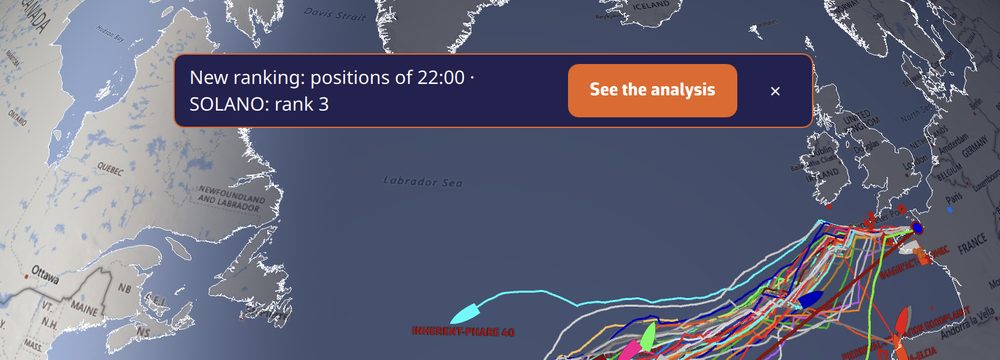 Banner “New ranking: positions of 22:00 · SOLANO: rank 3” at the top of the chart, with the “See the analysis” button
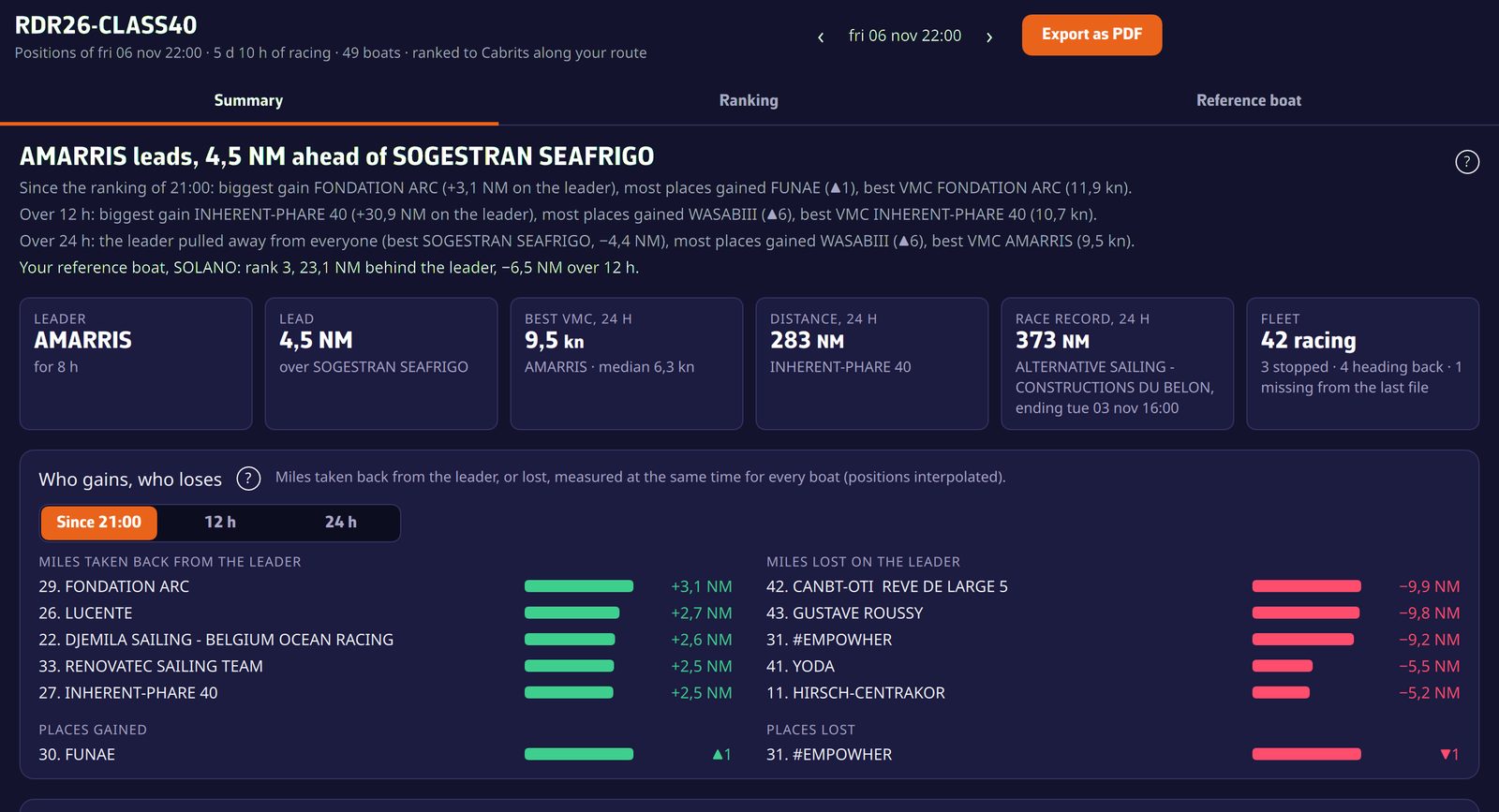 Summary of the RDR26-CLASS40 analysis: the sentence at the top (“AMARRIS leads, 4.5 NM ahead of SOGESTRAN SEAFRIGO”), the summary of each period, the Leader, Lead, VMC, Distance, Race record 24 h and Fleet boxes, then “Who gains, who loses”
Going further
Opening the analysis
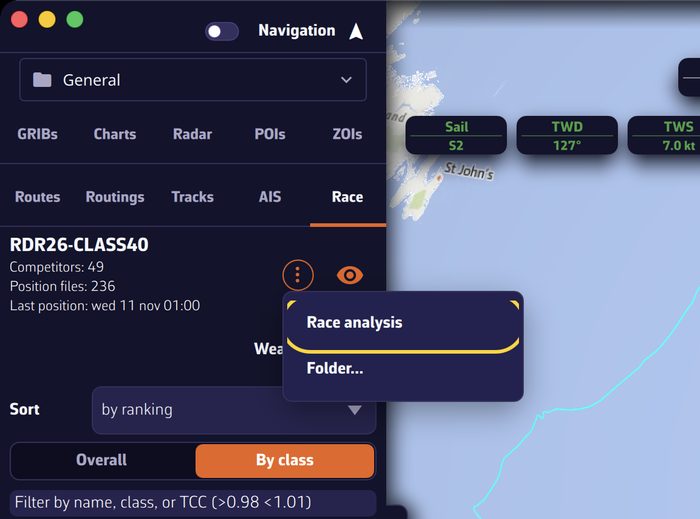 “Race” tab: the ⋮ menu to the right of the race name, open on “Race analysis” and “Folder…”
- The banner appears after every download that brings new positions, automatic or not. It gives the time of the positions and, if you have chosen a reference boat, its rank. It stays until you open the analysis or close it with ✕.
- “Race analysis”, in the ⋮ menu of the Race tab, to the right of the race name, can be used as soon as the race has positions.
On a computer, the analysis opens in its own window, which you can place next to the chart. On a phone, a tablet and in the browser, it fills the screen, with a “Close” button at the bottom. It is only calculated while it is open, and updates by itself when new positions arrive.
The rankings
A ranking corresponds to one position file: the instant shared by most of the boats in the file. For each ranking, NavimetriX brings all boats back to that instant, each one placed between the two positions around it, then ranks them by their distance to the finish along your route, like the list in the Race tab. It repeats the same calculation 12 hours and 24 hours earlier, which gives the three periods of the analysis:
- since the previous ranking (“Since 21:00”);
- over 12 h;
- over 24 h.
A period only appears when the race has lasted long enough.
At the top of the window, a line summarizes the ranking shown, for example “Positions of Fri 06 Nov 22:00 · 5 d 10 h of racing · 49 boats · ranked to Cabrits along your route”. The ‹ and › arrows on either side of the date move to the previous or next ranking: the whole analysis is recalculated at that instant.
Boats missing from the last file. A boat whose last position is older than the ranking is not frozen at that position: it is measured at the time of its last position, and compared with the leader at that same time. The list shows this as “Position of 21:00”.
The summary
The sentence at the top names the leader and its lead. Below it, one line per period: the biggest gain (the miles taken back from the leader), the most places gained and the best VMC. “The leader pulled away from everyone” means that nobody took miles back from it. The last line, in green, summarizes your reference boat.
The boxes:
- Leader: the boat in front, and for how long;
- Lead: its gap over the second;
- Best VMC, 24 h: the best of the fleet, with the median (half the fleet faster, the other half slower);
- Distance, 24 h: the longest, measured in straight lines between positions, so a little less than the distance really sailed;
- Race record, 24 h: the best 24 hours since the start, and when they ended;
- Fleet: the boats racing, stopped, heading back and missing from the last file.
Who gains, who loses lists, for the chosen period (“Since 21:00”, “12 h”, “24 h”), the five boats that took back the most miles from the leader and the five that lost the most, then those that gained and lost the most places. Miles are measured at the same time for all boats. A click on a boat makes it your reference boat.
The fleet plan
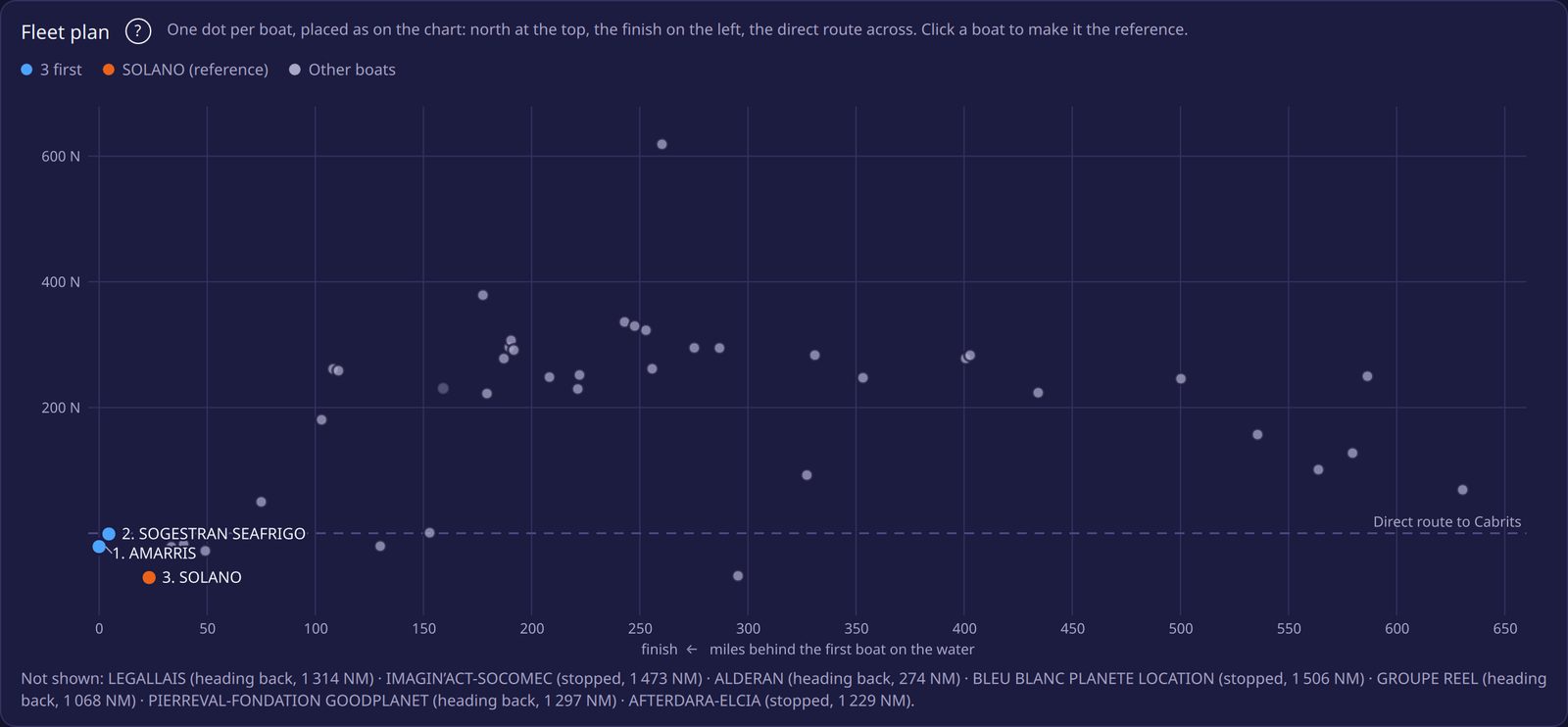 Fleet plan of the RDR26-CLASS40: one dot per boat, the finish on the left, north at the top, the direct route to Cabrits dashed; the first three in blue, SOLANO in orange; below the chart, the boats not shown (stopped or heading back)
Each dot is a boat, placed as on the chart:
- across, its distance in miles behind the first boat on the water, measured to the finish. The finish is on the side where it lies on the chart: on the left for a race heading west, like the Route du Rhum;
- up and down, its distance north or south of the direct route, drawn as a dashed line. For a race heading north or south, it is its distance east or west.
The first three are in blue, your reference boat in orange. A paler dot is a boat missing from the last file, at its last position. Boats that are stopped, heading back or have not reported for a long time are not placed: they are named below the chart (“Not shown”), with their gap. On a computer, hover over a dot to read the boat’s name, its gap, its distance from the route and its 12 h figures. A click on a dot makes it your reference boat.
The gap to the leader since the start
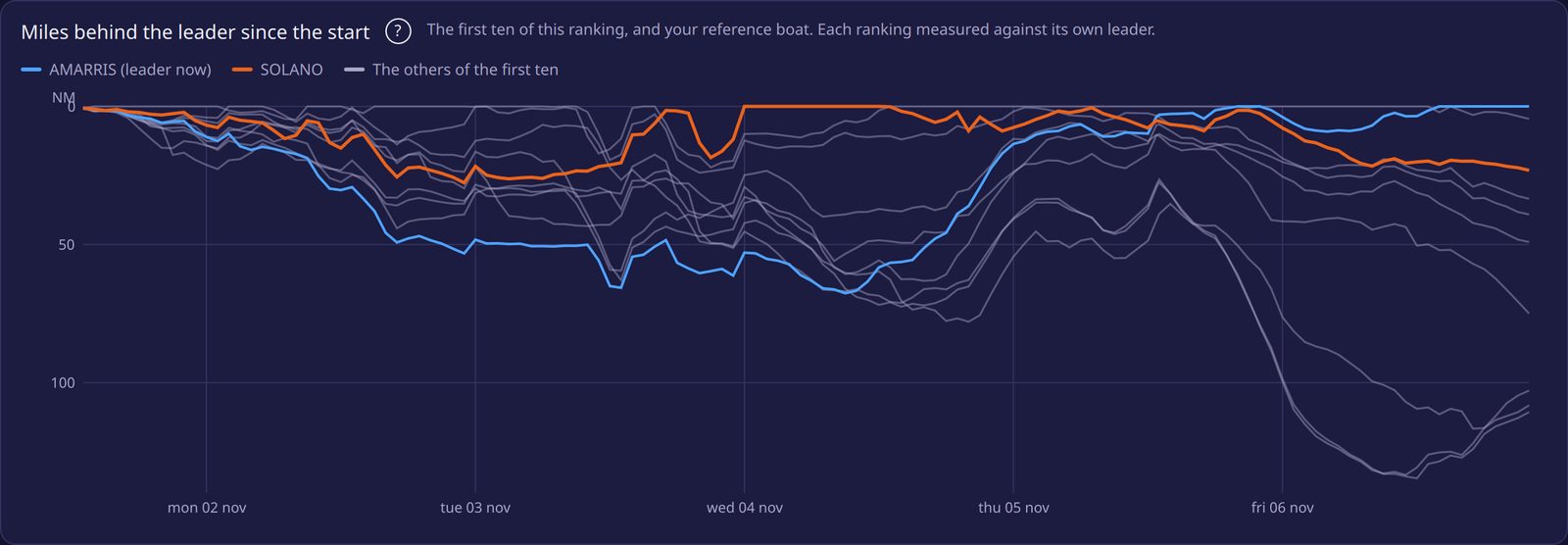 Gap in miles to the leader since the start: one curve per boat among the first ten, the current leader in blue, SOLANO in orange, days along the horizontal axis
One curve per boat: its gap to the leader at each ranking since the start, measured against the leader of that moment. At zero, the boat was leading; the lower the curve, the further behind. The chart shows the first ten of the ranking displayed and your reference boat; the current leader is in blue, your boat in orange. On a computer, point at the chart to read the values of one ranking.
The speeds of the fleet
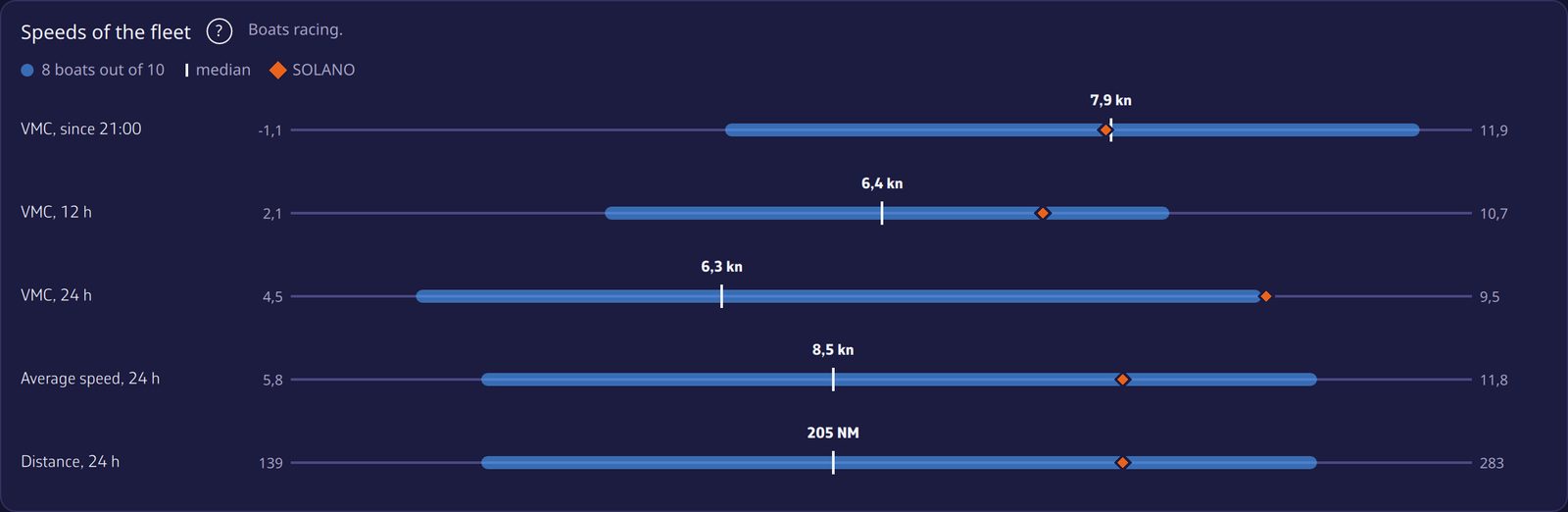 Speeds of the fleet: for the VMC since 21:00, over 12 h and over 24 h, then the average speed and the distance over 24 h, the line from slowest to fastest, the band of 8 boats out of 10, the median and the diamond for SOLANO
For each measure (the VMC of each period, then the average speed and the distance sailed over 24 h), the thin line goes from the slowest boat to the fastest, the band holds 8 boats out of 10, the vertical tick is the median and the diamond is your reference boat. Only the boats racing count: a boat in port, stopped or heading home would pull down the bottom of the band without saying anything about the race.
The Ranking tab
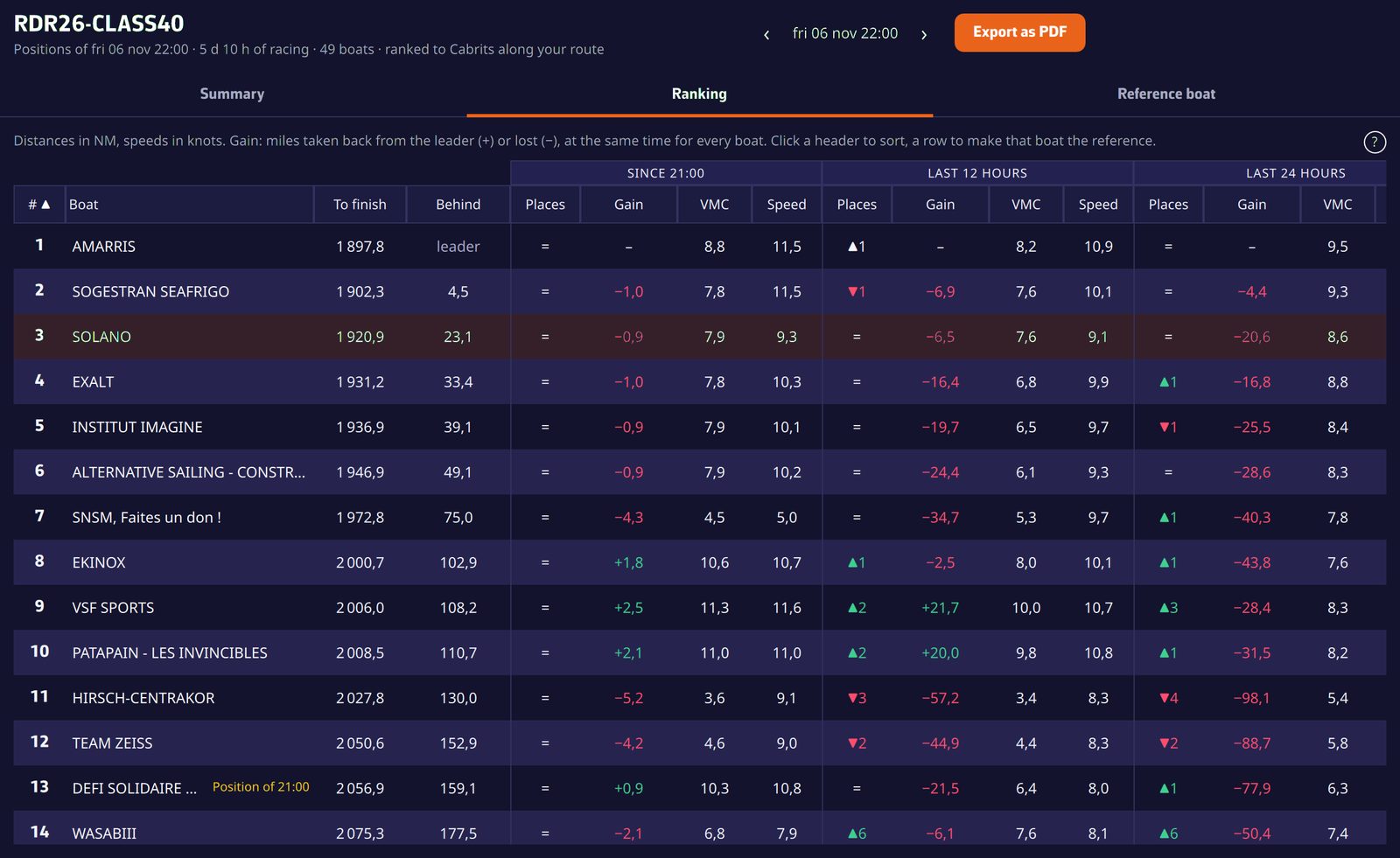 “Ranking” tab: rank, boat, distance to finish and gap, then for each period (Since 21:00, Last 12 hours, Last 24 hours) the places gained or lost, the gain on the leader, the VMC and the speed; SOLANO highlighted
The full ranking, one row per boat:
- “To finish”: the distance to the finish along your route; “Behind”: the gap to the leader;
- for each period (“Since 21:00”, “Last 12 hours”, “Last 24 hours”): “Places” gained (▲) or lost (▼), “Gain”, the miles taken back from the leader (+) or lost (−), “VMC”, the speed towards the finish, and “Speed”, the average speed over the ground; for 24 hours, “Distance”, the distance sailed, replaces the speed;
- then “Course”, the course steered over the last hour, “Route”, the miles north (N) or south (S) of the direct route, “Best 24 h”, the boat’s best 24 hours since the start, and “Rank, 24 h”, a small curve of its rank over the last 24 hours (green if it is improving, red if it is slipping back).
When the window is narrow, the table scrolls sideways.
A click on a header sorts the column, a click on a row makes that boat your reference, highlighted. Next to the name, a status flags special cases:
| Status | Meaning |
|---|---|
| “Position of 21:00” | missing from the last file: measured at the time of its last position |
| “Stopped” | under 1 knot over the last 3 hours |
| “Heading back” | moving away from the finish at more than 1 knot |
| “Old position” | no report for more than 6 hours (or three intervals between files, if they are longer) |
| “No position”, “Finished”, “Retired” |
The reference boat
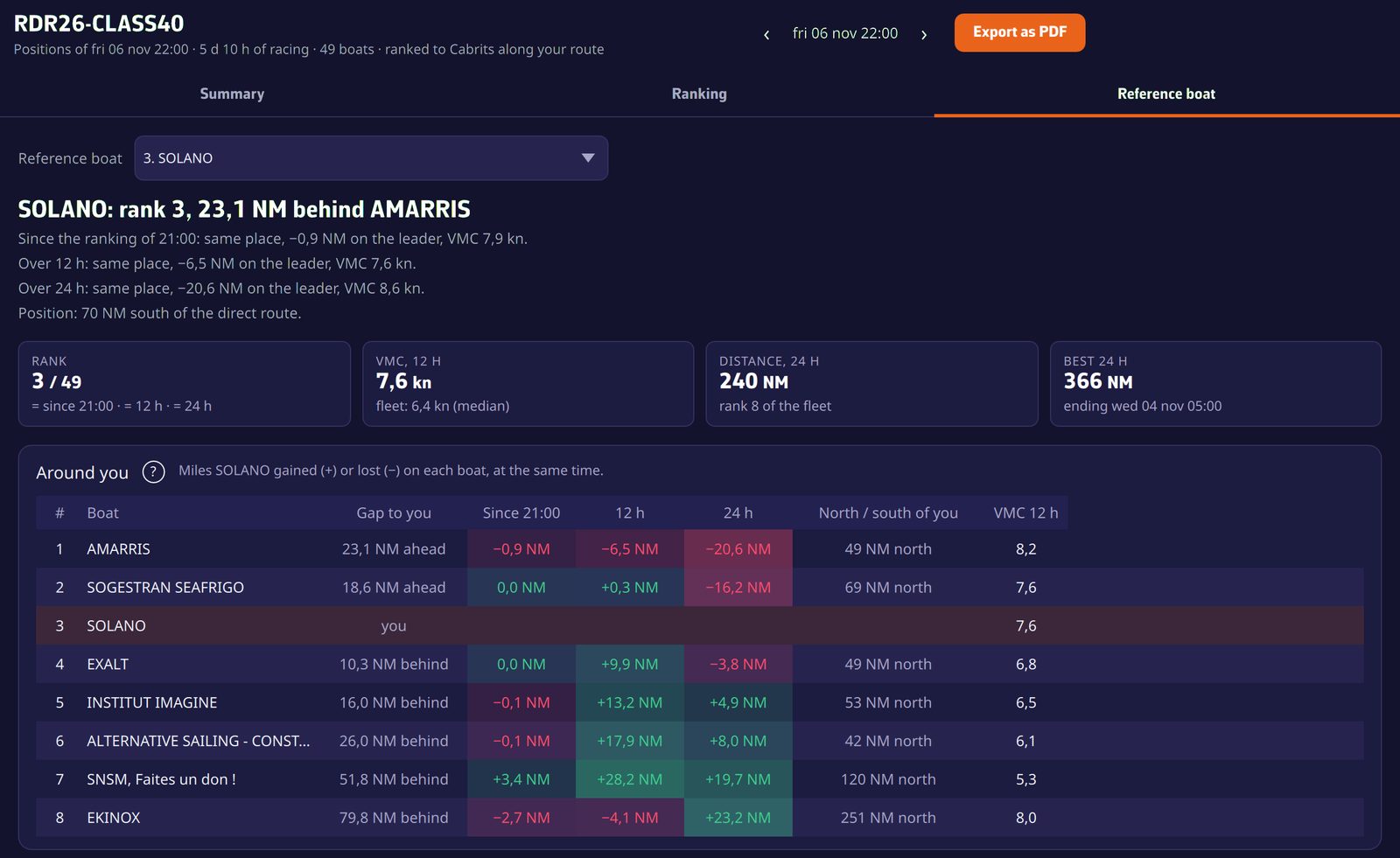 “Reference boat” tab for SOLANO: “SOLANO: 3rd, 23.1 NM behind AMARRIS”, one line per period, the Rank, VMC, Distance and Best 24 h boxes, then “Around you” with the miles gained or lost on the five boats ahead and behind
Choose it in the “Reference boat” list at the top of the tab, or with a click on a boat elsewhere in the analysis. It is the same as the one in the banner, and it is saved with the race.
- The sentence at the top gives its rank and its gap; one line per period gives its places gained or lost, its miles taken back from or lost to the leader and its VMC; the last one gives its position relative to the direct route.
- The boxes: its rank and how it changed over each period, its 12 h VMC against the fleet median, its 24 h distance and its rank for it, its 24 h record.
- Around you: the five boats ahead of it and the five behind. For each period, the miles your boat gained (+, green) or lost (−, red) on each one, measured at the same time for both; the stronger the color, the bigger the gap. “Gap to you” gives the distance between you now, “North / south of you” its position across the course.
- Ranking after ranking: one line per position file, the latest at the top, with the rank, the places gained or lost since the previous file, the gap to the leader of that file, the miles taken back from or lost to it, the VMC and the speed. “new” flags a change of leader.
- Rank since the start and VMC over 4 h against the fleet: two charts covering the whole race. The second places your boat’s VMC within the band of 8 boats out of 10 of the fleet, with its median; here too, only the boats racing count.
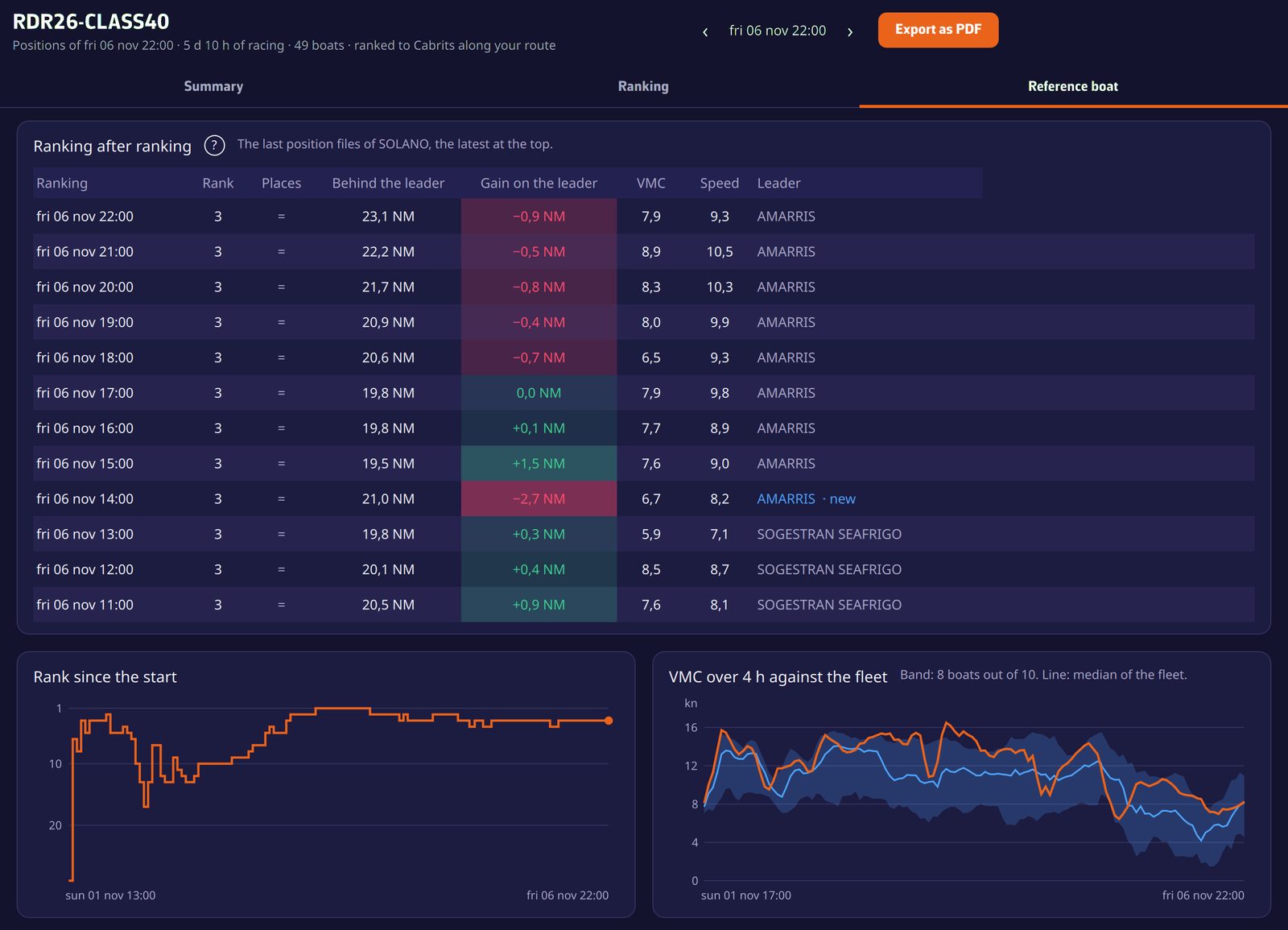 SOLANO’s ranking after ranking, then the charts “Rank since the start” and “VMC over 4 h against the fleet”
Corrected time and classes
When the boats’ ratings (TCC) differ, a “Real time / Corrected time” choice appears at the top of the window. It follows the setting of the Race tab, and changes it. In corrected time, rank, gaps and gains use the estimated corrected time (the time sailed, plus the distance to go at the average speed since the start, multiplied by the TCC, plus penalties): gaps and gains are then expressed in hours and minutes, and speeds are divided by the TCC so as to compare boats of different ratings.
When the race has several classes, a “Whole fleet” list lets you analyse a single class.
The “?” buttons
Each box has its ? button, which explains what it shows, followed by the vocabulary common to the whole analysis: VMC, “at the same time”, “along your route” and corrected time. Tap “Close” or outside the window to go back.
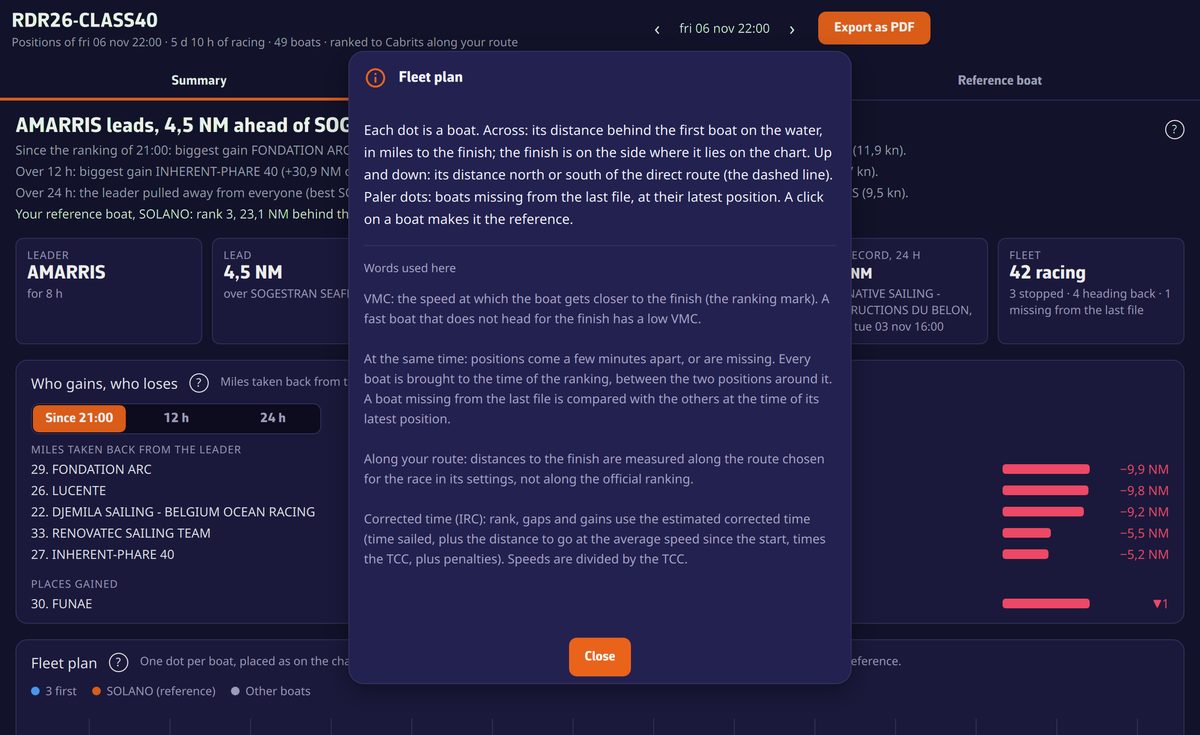 Help for the fleet plan: what each dot shows, then the vocabulary (VMC, at the same time, along your route, corrected time)
The PDF report
“Export as PDF” prepares an A4 report on a white background whatever the app theme:
- a map of the fleet, with the tracks, the positions, the first three, your reference boat and the direct route, followed by the key figures;
- who gains and who loses, since the previous ranking, over 12 h and over 24 h;
- the fleet plan, the gap to the leader since the start and the speeds of the fleet;
- the full ranking;
- the page of your reference boat.
A preview opens first. On a computer, “Save” stores the file in your Downloads folder, under a name that gives the race, the date and the time of the ranking, for example RDR26-CLASS40_analysis_2026-11-06_2200.pdf. On a phone and a tablet, “Share” sends it by email, messaging or to your files. The map background comes from the Internet; without a connection, only the areas already saved on the device are shown.
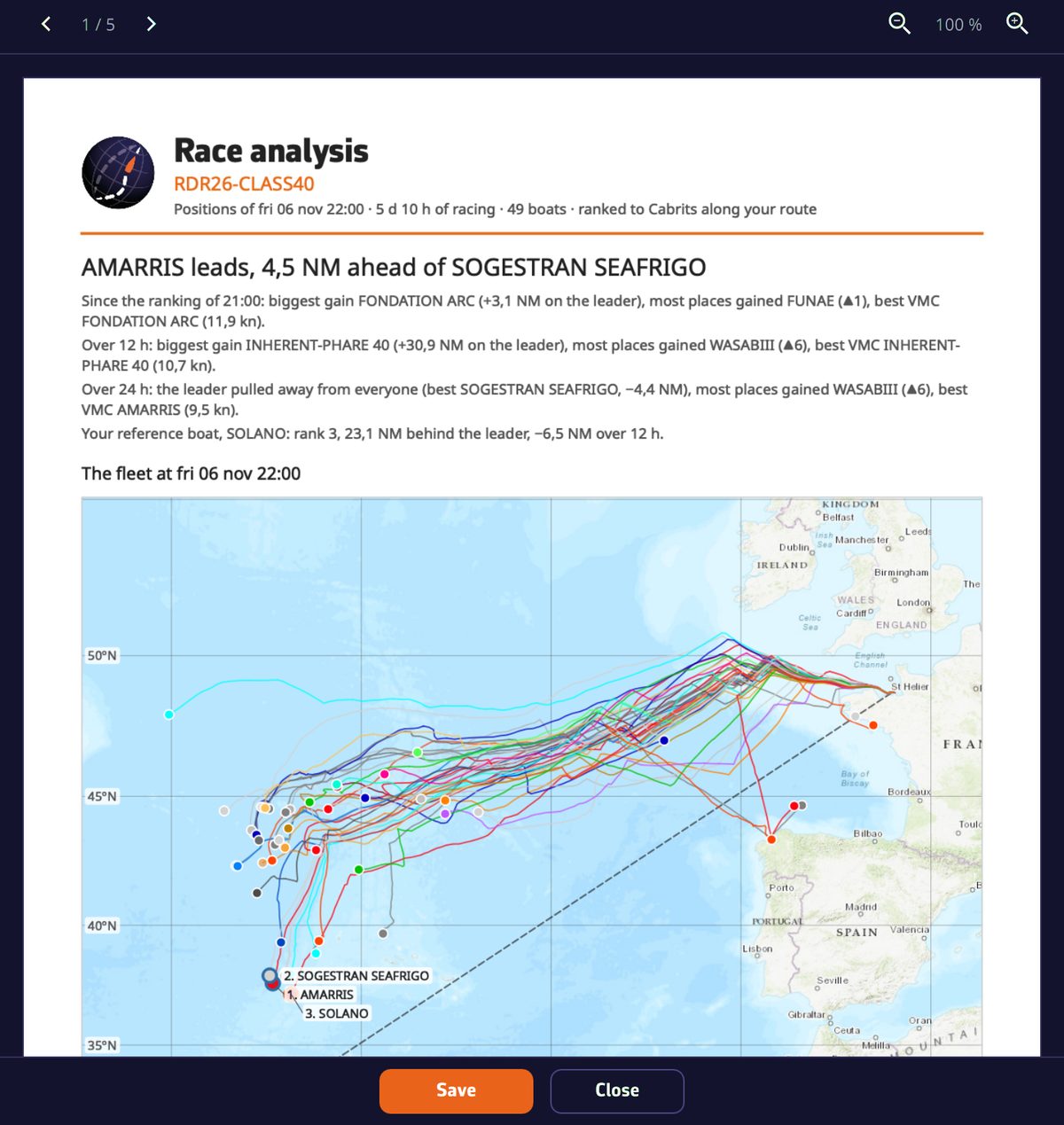 The first two pages of the PDF report: the fleet map and the key figures, then who gains and who loses
The vocabulary
- VMC (Velocity Made good on Course): the speed at which the boat is closing on the finish, that is, on the ranking mark. A fast boat that is not heading for the finish has a low VMC.
- At the same time: positions arrive a few minutes apart, or are missing. Each boat is brought back to the time of the ranking, between the two positions around it.
- Along your route: distances to the finish are measured along the route chosen in the race settings. The official ranking may differ.
If the analysis does not appear
- “Choose the route of the race in its settings: the rankings are measured along it.”: the “Rankings” section of Settings > Race tracking has no route.
- “No position file yet. The analysis appears with the first rankings.”: download or import positions.
- “No race loaded.”: import the race file (.dcc).