NMEA 0183 connection
BeginnerThe essentials
NMEA 0183 is the text language of onboard instruments: each device sends sentences (for example $GPRMC for position, $IIMWV for wind). NavimetriX receives them over the Wi-Fi of a gateway or multiplexer (UDP or TCP), or over a USB cable on a computer. On a computer, NMEA data can also arrive over a network cable (Ethernet), exactly as over Wi-Fi, provided the computer is on the same network as the gateway. An NMEA 2000 network goes through a gateway that converts it to NMEA 0183.
NMEA requires the Premium subscription. It does not exist in the browser version.
- Connect the device to the Wi-Fi of your NMEA gateway (not the marina’s).
- Open the right-hand “Settings” drawer, “GPS & NMEA” section.
- Tap “Scan NMEA devices”, then “Start Scan”.
- When a stream is found, tap “Apply settings”: the protocol, address and port are filled in, and the “NMEA” switch is turned on.
- Check that sentences are scrolling in the “Incoming NMEA sentences” console, at the very bottom of the page.
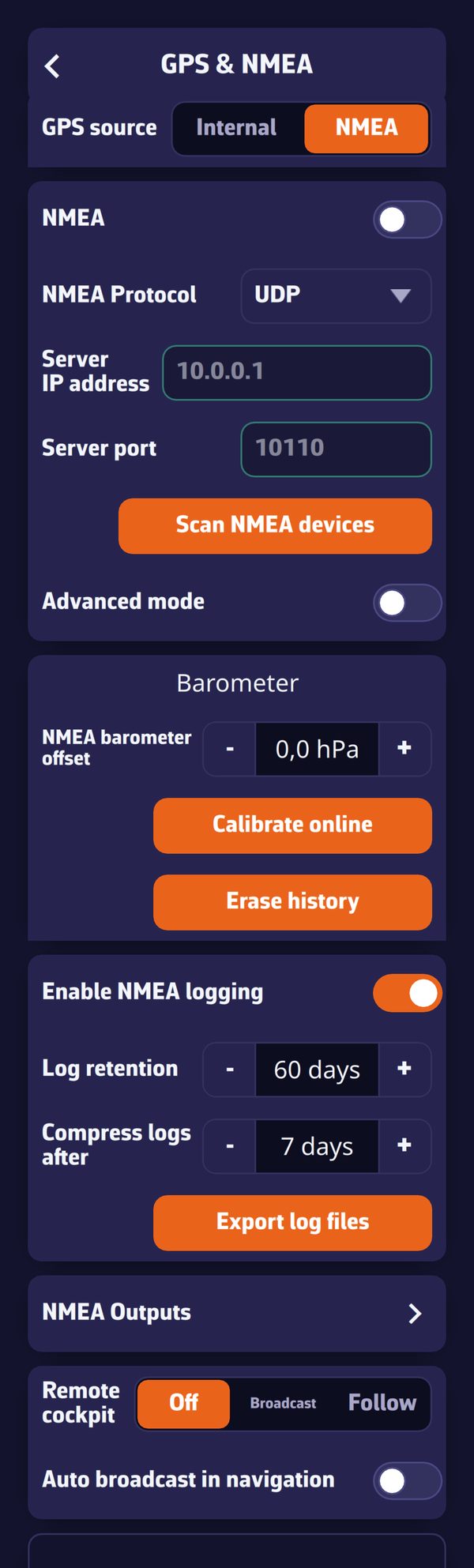 The “GPS & NMEA” page in simple mode
Going further
The page settings (simple mode)
| Setting | Values | Default |
|---|---|---|
| “GPS source” | “Internal” or “NMEA” | Internal on mobile, NMEA on computer |
| “NMEA” | switch | off |
| “NMEA Protocol” | “UDP”, “TCP”, “SERIAL”, “DEMO” | UDP |
| “Server IP address” | gateway address | 10.0.0.1 |
| “Server port” | 1 to 65535 | 10110 |
| “Serial port” (SERIAL) | detected ports | |
| “Baud rate” (SERIAL) | 4800, 9600, 38400, 115200 | 9600 |
- “GPS source”: “NMEA” takes the position from the stream, “Internal” from the device’s GPS (see Device GPS and external GPS).
- The “NMEA” switch controls all NMEA reception and output on this device. It is specific to each device. It also appears in the window shown when you turn Navigation mode on or off, and the app remembers your choice for each direction: NMEA on while underway and off in port, for example.
- UDP: the gateway broadcasts its sentences on the network, and NavimetriX listens to the port on all of the device’s networks. Only the port matters, the IP address is not used. This is the preferred choice: several devices receive the same stream.
- TCP: NavimetriX connects to the gateway, at the IP address and port given. Some gateways only accept a limited number of TCP clients.
- SERIAL: a gateway or GPS plugged in by USB, on computer only (macOS, Windows, Linux). On phones and tablets, the choice is grayed out.
- DEMO: replays a recorded passage, to discover the app ashore. Choosing it turns on the “NMEA” switch. Demo data is never saved in the NMEA log.
“Advanced mode”, at the bottom of the block, opens separate links for GPS, AIS and three additional links: see Multiple links and position source.
Scanning for NMEA streams
“Scan NMEA devices” opens the “NMEA Device Scanner”. “Start Scan” tries the settings of common gateways:
- over UDP, it listens at the same time on the usual ports: 10110 (the standard port), 50000 (NKE Wi-Fi box), 11101 (PredictWind DataHub), 2000 (Digital Yacht), 5000 (EM-TRAK), 1456 (Yacht Devices), 60002 (Actisense W2K-1), 24000 (Ocean Signal), 40000 (AdvanSea), 1024 (PIXEL EXOCET);
- over TCP, it tries the default address and port of each known gateway: ShipModul MiniPlex, NKE Wi-Fi box, Digital Yacht, EM-TRAK, Vesper Marine, Garmin Cortex, AMEC, Navico GoFree (B&G, Simrad, Lowrance), Actisense W2K-1, Comar, Brookhouse, Ocean Signal, Yacht Devices, AdvanSea, Weatherdock;
- on a computer, it also tries each serial port at 9600, 4800, 38400 and 115200 baud.
Each stream found is displayed with its protocol, address, port and the list of sentences received, which lets you recognize the device. In simple mode, the scan stops at the first stream found; “Apply settings” sets it on the page and turns on “NMEA”. If the stream contains a position, the “GPS source” switches to “NMEA”; if it contains AIS, targets are drawn from it. A scan log is displayed below (“Clear Log” empties it).
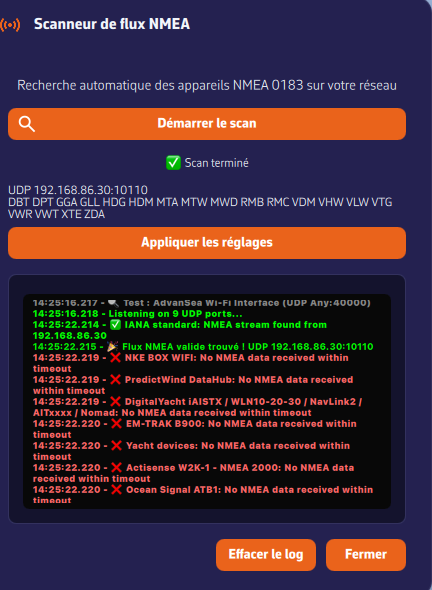 The NMEA device scanner after a successful scan
The scan only knows the default addresses: a gateway that the onboard router has given a different address is only found over UDP. In that case, set the page by hand.
The “Incoming NMEA sentences” console
At the bottom of the page, the console shows what is actually passing over the link. It is the diagnostic tool: if sentences are scrolling, the link is good.
- At the top, the link status, for example “UDP: 10110 (listening)”, “TCP: 10.0.0.1:10110 (waiting)”, “NMEA disabled” or “Demo mode”.
- Received sentences are displayed in green, those NavimetriX sends (NMEA outputs) in orange, the most recent at the top. The console keeps the last 200 lines.
- The “Input” and “Output” boxes filter the two directions and each shows the number of messages per second.
- “Pause” freezes the display (“Resume” restarts it), “Copy” copies the console lines to the clipboard, each marked [IN] or [OUT], to send to support for example, “Clear” empties the console.
The two “Port” messages
Two warnings may appear under the “Port” field:
- “Port already used by another input” (in red): two NavimetriX links target the same port, and this one is not listening. Give it another port. The relay port must also differ from the ports being listened to.
- “Port also used by another app” (in yellow, for information only): other software is listening on this port on the same device. If the gateway broadcasts to the whole network, both receive everything. If it only sends to a single recipient, only one of the two will receive the data: close the other software. This is often the explanation for a correctly set link that receives nothing.
Nothing arriving?
- Check the Wi-Fi: the gateway’s, not the marina’s.
- Check that the “NMEA” switch is on.
- Check the protocol and port in the hardware manual, or run a scan.
- Look at the console: if it is empty, the link receives nothing; if sentences are scrolling, the link is good and the problem is elsewhere.
Special cases
- Starlink antenna: put the multiplexer in Wi-Fi client mode on the Starlink router’s network, note the IP address it receives (preferably a fixed one), then set “TCP”, that address and the multiplexer’s port. Disable Wi-Fi client isolation on the router. The details are in the FAQ below.
- NKE Wi-Fi box: the scan tries its UDP port 50000 and its TCP address 192.168.56.1, port 50000. If nothing scrolls, update the box and, on a recent iPhone or iPad, switch its Wi-Fi to open mode: see the FAQ.
- USB on a computer: gateways seen as a standard serial port generally need no driver; otherwise, install the manufacturer’s (often FTDI or Prolific).
- Several devices on board: over UDP, each device receives the gateway’s stream. With UDP to a single address, with TCP or over USB, one device can relay what it receives on the local network for the others (advanced mode, “Relay on local network”): see NMEA outputs.
See also
- Device GPS and external GPS
- Multiple links and position source
- Received data and calculations
- NMEA log
- FAQ: How do I receive NMEA data from my boat instruments?
- FAQ: Do you support NMEA connections via USB?
- FAQ: How to receive NMEA data while connected to a Starlink antenna?
- FAQ: I cannot connect to my NKE WiFi box. What should I do ?
- FAQ: NavimetriX says “Port already used”. What should I do?