Internet AIS and sharing
BeginnerThe essentials
Without an AIS receiver on board, NavimetriX can display the vessels that the shore stations of the AISHub network receive and publish on the Internet. Conversely, your boat can share what it receives and measures, and even make itself visible to other NavimetriX users without a transponder.
We recommend that all users share their AIS feed, so that coverage is as good as possible for everyone.
These features require the Premium subscription and an Internet connection. In the browser version, only the display of Internet AIS is available.
To see Internet AIS:
- In “Settings”, “AIS” section, check that “AIS over Internet” is on (it is by default).
- Zoom in far enough on the chart: Internet targets are only requested from the approach to a harbor, when the chart covers a few miles.
- The targets appear in blue, unlike targets received on board, which are green.
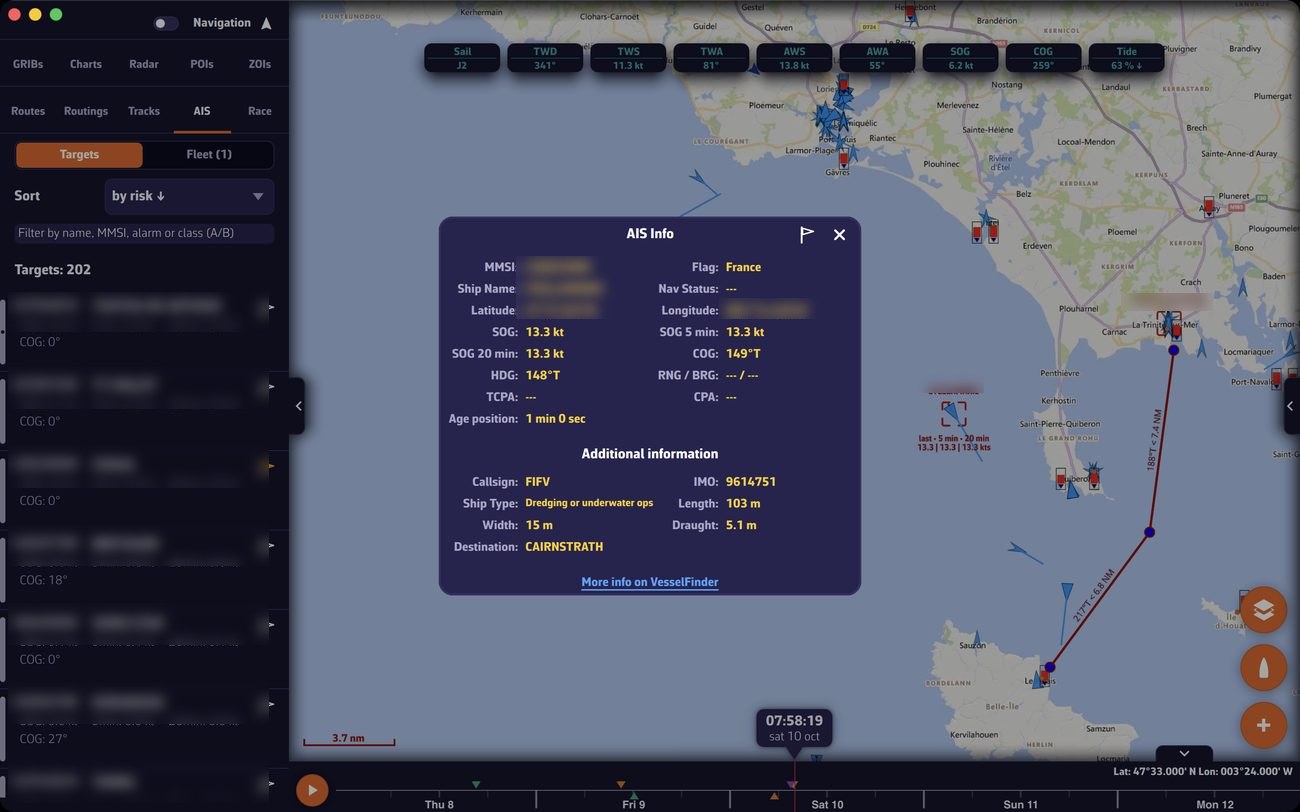 AIS targets received over the Internet off the Lorient roadstead and the Île de Groix: the target list in the left drawer (AIS tab), the “AIS Info” sheet of a selected target and the target triangles on the chart; names and MMSI numbers blurred
Warning: Internet targets are for information only. They go through shore stations and the network, with a delay, and do not cover everything. They do not replace an AIS receiver for safety.
Going further
How Internet AIS works
| Setting | Default |
|---|---|
| “AIS over Internet” | on |
- Targets are requested within a radius around your boat when you are navigating (Navigation mode, GPS position, speed above 0.8 knots), otherwise around the center of the screen. The radius is 50 nautical miles by default, automatically reduced in very busy areas.
- When the view is wider than a harbor approach, Internet targets are removed from the chart, and a message invites you to zoom in.
- They are displayed even outside Navigation mode.
- During a track replay or while following another boat, Internet AIS is switched off.
For everything else, Internet targets behave like targets received on board: selection, detailed sheet, list, alarms. See AIS targets.
Sharing the AIS data received on board
| Setting | Default |
|---|---|
| “Share AIS data” | on |
If you have an AIS receiver, NavimetriX sends the targets it receives back to the AISHub network, along with the AIS position of your own boat if your transponder sends it. This improves the network’s coverage where you sail. Sharing only works with Internet, never in “DEMO” mode.
Sharing the weather data from your boat
| Setting | Default |
|---|---|
| “Share weather data” | on |
Every 10 seconds, NavimetriX sends the weather measured on board (true wind, gusts, pressure, air and water temperatures) over the Internet as an AIS weather message. True wind must be available (instruments with a wind vane and anemometer). The message carries your boat’s MMSI if it is entered in “My Boat”, otherwise an identifier specific to the device. Never in “DEMO” mode, nor during a replay or while following another boat.
Vessels that broadcast their weather appear on the chart in light blue, and their sheet shows a “Weather” block.
Sharing my position without a transponder
| Setting | Location | Default |
|---|---|---|
| “Share my position” | “Settings”, “My Boat”, “AIS broadcast” block | off |
For a boat without an AIS transponder: every 10 seconds, NavimetriX sends your position as a class B transponder would, with the name and type of the boat. This position is sent to the NavimetriX servers. It is never transmitted on VHF.
Conditions: Premium subscription, Internet, a valid GPS position; never in “DEMO” mode, nor during a replay or while following another boat. Enter the name and, if you have one, the MMSI of your boat in “My Boat” (see My boat).
This broadcast does not make your boat visible to other vessels equipped with AIS: it does not replace a transponder.
Following a boat remotely
To follow the boat instrument by instrument from another of your devices, signed in to the same account, use the remote cockpit (“GPS & NMEA” page, “Remote cockpit” block): see Remote cockpit. For a friend or family member, share the link to the current track instead, which can be followed live: see Sharing a track.