Barometer and barograph
ExpertThe essentials
Atmospheric pressure, and above all how it changes, announces the weather to come: a rapid drop often precedes a gale. NavimetriX records the pressure continuously, over ten days, and displays it in two instruments.
- Add a “Barometer” for the current value and its 3-hour trend, or a “Barograph” for the curve from 2 hours to 10 days (“+” button, “Add instrument”).
- The pressure comes from an onboard barometer connected over NMEA, or failing that from the internal sensor of the phone or tablet, if it has one.
- For an accurate value, calibrate the barometer: Settings > “GPS & NMEA” > “Barometer” section > “Calibrate online” (Internet connection required).
- To be warned of a change, turn on Settings > “Alarms” > “Barometer”.
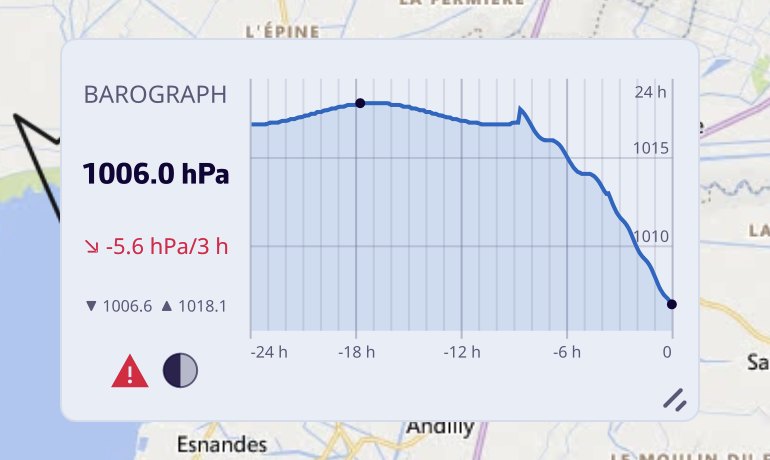 Barograph instrument on the chart: 24-hour curve with a marked drop, current pressure, 3-hour trend, minimum and maximum, gale warning and moon phase
Going further
Where the pressure comes from
- An NMEA barometer (MDA or XDR sentences) always has priority.
- The internal sensor of the phone or tablet is only used if no NMEA barometer sends a pressure. It is read once every 30 seconds, which spares the battery. Computers have no pressure sensor.
When the pressure comes from the internal sensor, the barograph indicates it with the “INT” label.
The ten-day history
The app records the pressure once a minute, over ten days, as soon as a valid pressure exists, whether or not the barograph is displayed: adding the instrument shows the past immediately. A minute without a measurement remains a gap in the curve, never an invented line. On phones and tablets, outside Navigation mode, the pressure is only recorded while the app is in the foreground; in Navigation mode, it is recorded continuously. The history is kept on the device.
During a Replay, both instruments display the pressure of the replayed passage, not the onboard history.
The “Barometer” instrument
A needle barometer graduated from 960 to 1060 hPa, with the exact value and the 3-hour trend. As long as the history covers less than 3 hours, the trend is given over the available duration.
The “Barograph” instrument
The pressure curve, with the current value, the 3-hour trend, and the minimum and maximum of the displayed window.
- Gale warning: when the pressure has dropped by 3 hPa or more over the last 3 hours, a red pictogram appears and the trend turns red. A more moderate drop, from 1.5 hPa, colors the trend orange.
- Cursor: on a computer, hover over the curve with the mouse to read the time and pressure at any point. On a touch screen, the tile is reserved for the move gesture.
- Layout: the tile puts the header on the left when it is wide, at the top otherwise. On the chart, it is created in a wide format.
Instrument settings (right-click or long-press), specific to each copy:
| Setting | Values | Default |
|---|---|---|
| “Time window” | “2 h”, “8 h”, “24 h”, “10 d” | 24 h |
| “Moon phase” | Pictogram of the Moon’s phase in the header | No |
| “1013.25 hPa reference” | Dotted line of normal sea-level pressure | No |
The curve color is shared with the “Chart (history)” instrument set to pressure.
Barometer settings
In Settings > “GPS & NMEA”, “Barometer” section (on the simple page, or in the “Instruments” tab in advanced mode):
| Setting | Effect | Default |
|---|---|---|
| “NMEA barometer offset” | Offset added to the NMEA barometer, from -15 to +15 hPa in steps of 0.1. Tied to your account, since it depends on the boat | 0 |
| “Use the device sensor” | Allows the internal sensor | Yes |
| “Device sensor offset” | Offset of the internal sensor, from -15 to +15 hPa. Specific to the device | 0 |
| “Relay device barometer on local network” | Broadcasts the internal sensor’s pressure as XDR and MDA sentences, every 5 seconds, on the boat’s network | No |
| “Relay port” | Network port of this broadcast | 10111 |
| “Calibrate online” | Calculates the correction automatically, see below | |
| “Erase history” | Empties the ten-day history, after confirmation |
The internal sensor rows only appear on a device that has one.
To send the internal sensor’s pressure to the instruments over the configured NMEA link, turn on “XDR / MDA” in the NMEA outputs instead, under “Internal Sensors to NMEA” (see Navigation: GPS, NMEA and AIS).
Calibrate online
“Calibrate online” compares the measured pressure with the sea-level pressure given by the weather models at your position (the average of the models that cover the point), then sets the correction of the source currently in use: NMEA barometer or internal sensor.
It needs an Internet connection, a real GPS position (the approximate position from the network is not enough) and a measured pressure. Calibration is refused during a Replay or while following another boat.
If the correction changes by at least 1 hPa and a history exists, the app asks “Keep the pressure history?”. “Keep” shifts the old measurements by the same value, which is suitable if the error came from the sensor all along; “Erase” starts again from an empty curve, which is suitable if you have changed location.
For the internal sensor, the correction also contains the effect of the altitude at which the device is located. It therefore only applies where it was taken: if the device changes altitude by more than 25 meters, a message says so and offers to calibrate again.
The pressure change alarm
Settings > “Alarms” > “Barometer”:
| Setting | Values | Default |
|---|---|---|
| “Active” | Yes / no | No |
| Direction | “Drop”, “Rise”, “Both” | Drop |
| “Change” | 0.5 to 10 hPa | 3.0 hPa |
| “Over” | 1 to 6 h | 3 h |
| “Sound” | List of alarm sounds | Buzzer |
With the default values, the alarm applies the classic gale warning rule: a drop of 3 hPa in 3 hours. Like the other alarms, it only watches in Navigation mode (see Navigation alarms).