NavimetriX in a Browser
ExpertThe essentials
NavimetriX also opens in a web browser, in two ways:
- a share link received from another browser (a crew member, a friend ashore): it opens without an account and without installing anything, to replay a passage or follow it live;
- the full app, at nav.navimetrix.com, reserved for NavimetriX accounts with a valid subscription.
- To open a share link, simply tap it: the shared passage appears on the chart, with its playback bar.
- For the full app, open nav.navimetrix.com and sign in with your NavimetriX account.
- On a phone or tablet, prefer the installed app: it alone offers background GPS, alarms and offline use.
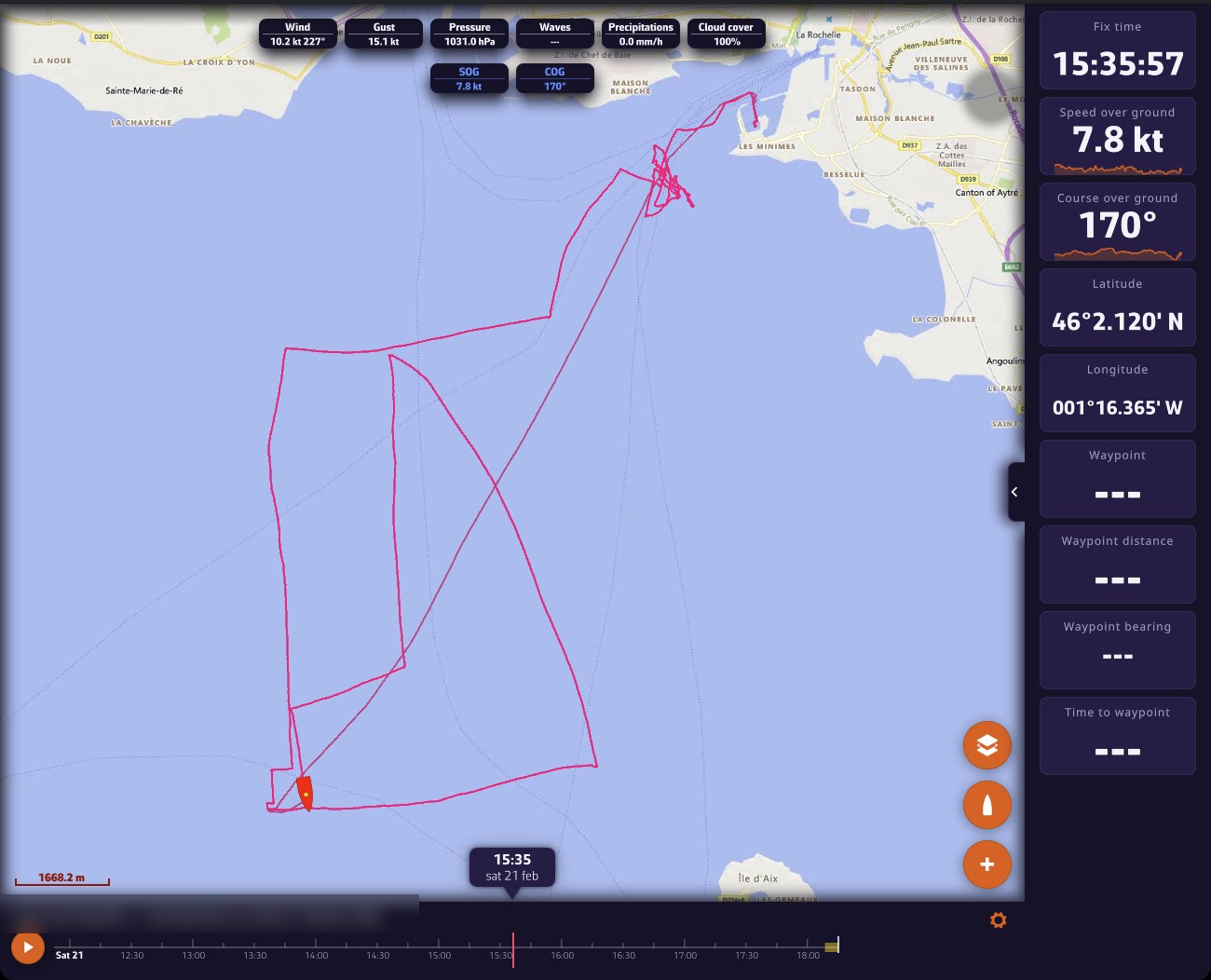 Share-link viewer in a computer browser: track replayed on the chart with the fleet, top pills, instruments on the right and playback bar at the bottom; the track title is blurred
Going further
The share-link viewer
A share link is created in the Tracks tab, from a track’s menu: “Share replay link” or “Share live link”. Anyone who has the link can replay the track and read its logbook in a browser. They cannot modify anything. See the chapter Tracks, Replay and Logbook.
The visitor has no account or subscription. The viewer therefore only shows what is useful for watching the passage:
- no left drawer (GRIBs, Routes, Routings tabs…) and no account icon;
- a Settings drawer reduced to what suits the page: Theme, General (language, time zone, units, colours, display scale), Forecast display, Instruments and About. Their choices stay in their browser;
- in the Layers menu, only the OSM and BING chart backgrounds;
- no tides, current atlases, weather charts or satellite images, which would show today’s situation over a past passage. Weather stations, lightning and rain radar are only offered if the loaded weather covers the present moment, typically for a live view.
Full screen on iPhone. Safari does not offer a true full screen on iPhone. For a share link, add the page to the home screen (Safari’s share button, “Add to Home Screen”): opened from its icon, it is displayed without Safari’s bars.
The full app in the browser
- At startup, you must sign in to your NavimetriX account. Without a valid subscription, the “Subscription required” screen appears: “Access from a browser is reserved for accounts with an active subscription. You can subscribe from the NavimetriX application on your phone, tablet or computer.” If the subscription service does not respond, the “Unable to verify your subscription” screen offers “Retry”.
- You cannot subscribe from the browser: the subscription window points to the App Store or Google Play (see Premium subscription).
- Signing out immediately reopens the sign-in window: the browser app does not work without an account.
- On a phone or tablet, the page first offers the native app: “Open in the App Store” or “Open in Google Play”, or “Continue in the browser”.
What the browser version does not do
A browser has no access to the onboard instruments and suspends a tab sent to the background. The browser version therefore removes:
- the Navigation mode switch;
- the GPS & NMEA page of the Settings: a browser cannot receive NMEA data (the format of onboard instrument data);
- the Alarms page: a browser tab cannot keep watch with the screen off;
- the Geogarage charts page and offline charts: the Geogarage account arrives through synchronization, but nothing is downloaded for offline use;
- Energy saving;
- C-MAP charts;
- the thunder sound associated with the lightning layer.
The rest follows your account as on other devices: routes, POIs (points of interest), ZOIs (zones of interest), routings, settings. See Sync between devices.