Premium Subscription
BeginnerThe essentials
NavimetriX can be used without a subscription, with limits: forecasts from the GFS model only, routing limited to 2 days, no Navigation mode and no onboard data. The Premium subscription opens the whole app and the NavimetriX account that synchronizes your devices. It is annual, with automatic renewal.
- Press the round orange button with the shopping cart
 , at the top right of the chart. It only appears as long as the device is not subscribed. Another way in: Settings > “Premium Subscription”.
 - In the “Premium Subscription” window, press the button that shows the price. The purchase goes through the App Store (iPhone, iPad, Mac) or Google Play (Android). The price comes from that store and is displayed in the currency of your store’s country (for example €79.99 in France on Google Play, at the time of the screenshot below). On Windows, Linux and in the browser, the purchase is made from the mobile apps.
- Then create your NavimetriX account on that same device and sign in to it, then sign in to that account on your other devices: the subscription is recognised there. See NavimetriX account.
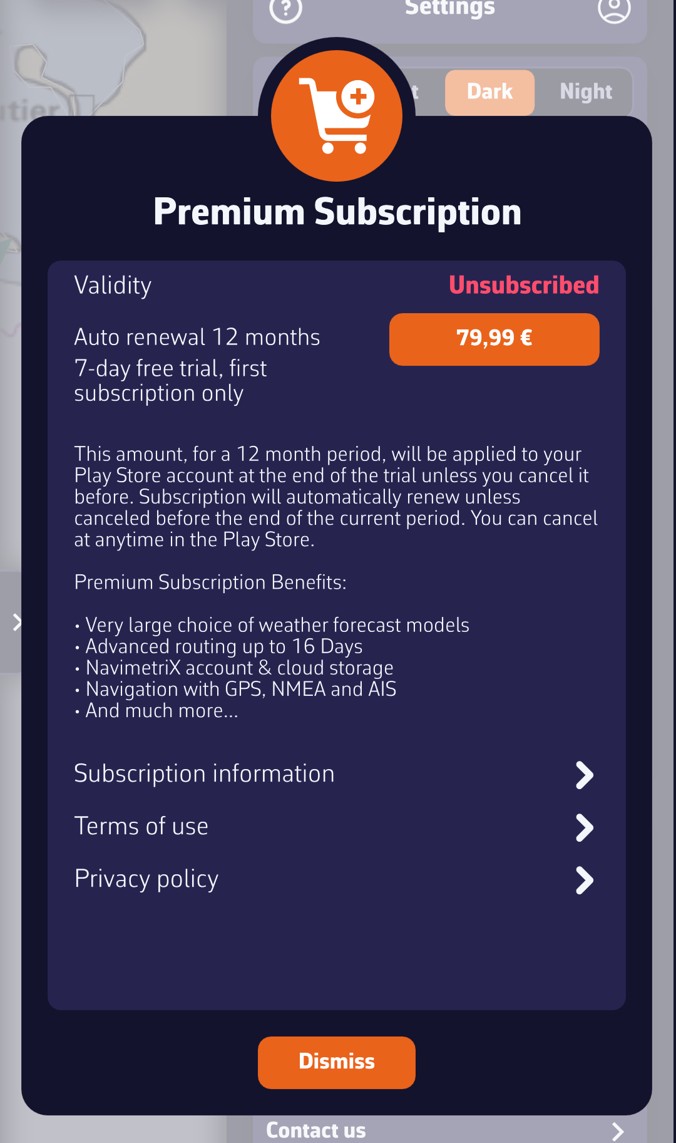 “Premium Subscription” window on Android, device not subscribed: validity “Unsubscribed”, price button (€79.99 in this example), 7-day free trial, subscription information
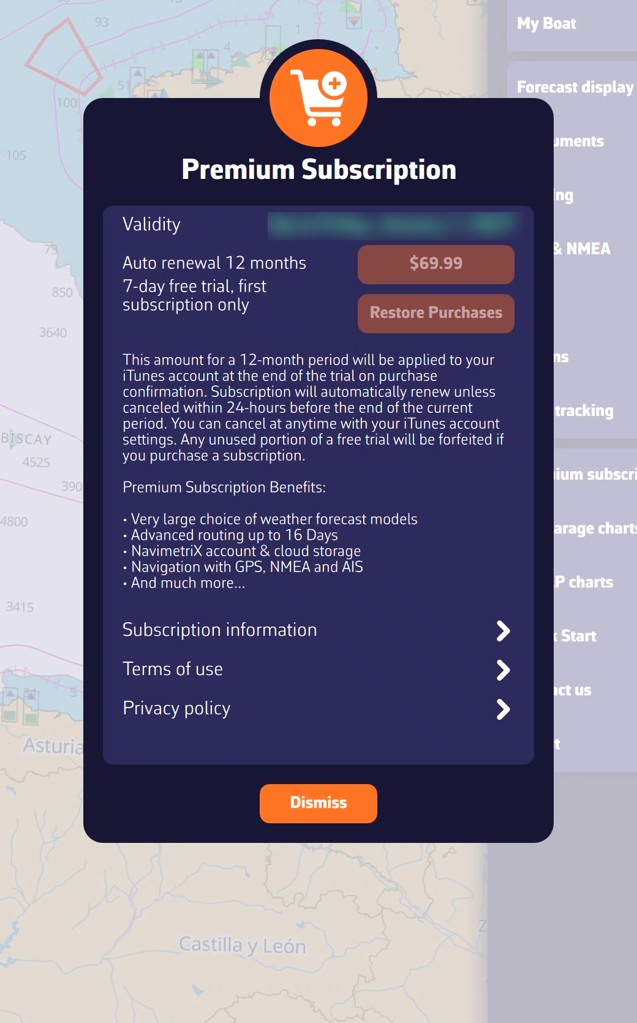 “Premium Subscription” window on iPad, active subscription: the validity shows the subscription end date (blurred here), the price button is greyed out and “Restore Purchases” remains available; here the price is in dollars, because the device’s store is American
Going further
Free version and Premium version
Without a subscription, you keep in particular the chart and its layers, POIs (points of interest), routes and ZOIs (zones of interest), atmospheric GFS model GRIBs, worldwide (a GRIB is a weather forecast file) and weather routing up to 2 days. Beyond that, the calculation stops with the message “Routing calculation stopped as we reached the routing max duration of 2 days for non Premium users”.
The following are reserved for the Premium subscription:
- weather: all models other than GFS, regional models, wave and current GRIBs, and historical weather (“Load historical GRIB”);
- routing beyond 2 days: the maximum duration can then be set from 1 to 30 days (Settings > “Routing” > “Maximum duration”), within the limit of the GRIB’s duration;
- the AI briefing of a routing, which also requires an Internet connection and a signed-in account;
- Navigation mode: track recording and alarms (see Operating modes);
- onboard data: NMEA reception (the format of instrument data), DEMO mode included;
- AIS (the automatic identification system for vessels): display of targets, AIS over the Internet, sharing your position;
- the settings pages “Instruments” and “AIS”;
- the anchor alarm (“Drop anchor”) and its SMS alert;
- the NavimetriX account: creating it, synchronization between devices and uploading tracks to the account.
Without a subscription, Navigation mode, turning on NMEA reception (DEMO mode included), “Drop anchor” and the “Instruments” and “AIS” settings pages open the “Premium Feature” window: “This function requires a valid Premium subscription.” The “Subscribe” button leads to the subscription window. Elsewhere, the app reacts differently: reserved models do not appear in the list, the AI briefing button stays greyed out, and historical weather and routing beyond 2 days stop with a message.
The subscription does not include nautical charts: Geogarage charts and C-MAP charts are purchased separately (see the chapter Charts).
The “Premium Subscription” window
- Validity: “Unsubscribed” without a subscription, “Until” followed by the expiry date, or “Expired”. The date used is the furthest between the purchase made on the device and the subscription held by your account.
- The price button: the price comes from your device’s store (App Store or Google Play), in the currency of that store’s country. It is greyed out when the subscription is valid.
- Restore Purchases (iPhone, iPad, Mac): retrieves a subscription already taken with the same Apple ID, after a reinstall for example.
- Automatic 12-month renewal.
- 7-day free trial, on first subscription only. The trial is only granted once: per Google account on Android, per Apple ID on iPhone, iPad and Mac. If you have already had it, the subscription is charged from the moment you subscribe.
Subscribe from a Windows or Linux PC or a browser
In-app purchase only exists on iPhone, iPad, Mac and Android. On Windows, Linux and in the browser, the subscription window explains this: take the subscription on a phone, a tablet or a Mac, create your account on that device, then sign in to that account on the PC. The subscription is then shared.
The device that made the purchase passes the expiry date to the server once the account is signed in on that device. After a renewal, launch the app on that device so that your other devices see the new expiry date.
Cancel
Cancellation is done outside the app, in the store that collected the subscription: your Apple account settings (iPhone, iPad, Mac) or Google Play (Android). For a first subscription, cancel before the end of the 7-day trial if you do not want to be charged.
Share the subscription
The NavimetriX account shares the subscription between all your devices, whatever their platform. Family sharing between different Apple IDs or Google accounts is set up in the store: see the two FAQ pages below.
See also
- NavimetriX account
- Sync between devices
- Historical weather and AI briefing
- FAQ: Why take a Premium subscription?
- FAQ: How do I subscribe and create a NavimetriX account?
- FAQ: How do I take a subscription on my Windows PC?
- FAQ: I can’t take my subscription on the Google Play Store
- FAQ: I would like to cancel my Premium subscription
- FAQ: sharing between two Android devices and between two Apple devices
- FAQ: What is the price of the Premium subscription?