Enabling C-MAP on iPhone and iPad
ExpertThe essentials
On iPhone and iPad, an “Enable C-MAP” switch in the device Settings > Apps > NavimetriX lets you avoid loading C-MAP at all, if you do not use these charts. It is on by default.
Going further
Turning C-MAP off
The C-MAP chart engine takes up memory even when you are not using it. On iPhone and iPad, you can switch it off:
- Open the Settings of the iPhone or iPad, select “Apps” then “NavimetriX”.
- In the “C-MAP charts” group, turn off “Enable C-MAP” (on by default).
- Quit NavimetriX completely and relaunch it: the setting takes effect at the next launch.
With C-MAP off, the chart engine is not loaded: the “C-MAP Charts” page of the Settings, the “C-MAP” base map in the layers menu and the features that depend on it (AutoRouting, object information) disappear. To get C-MAP back, turn the switch on again and relaunch NavimetriX.
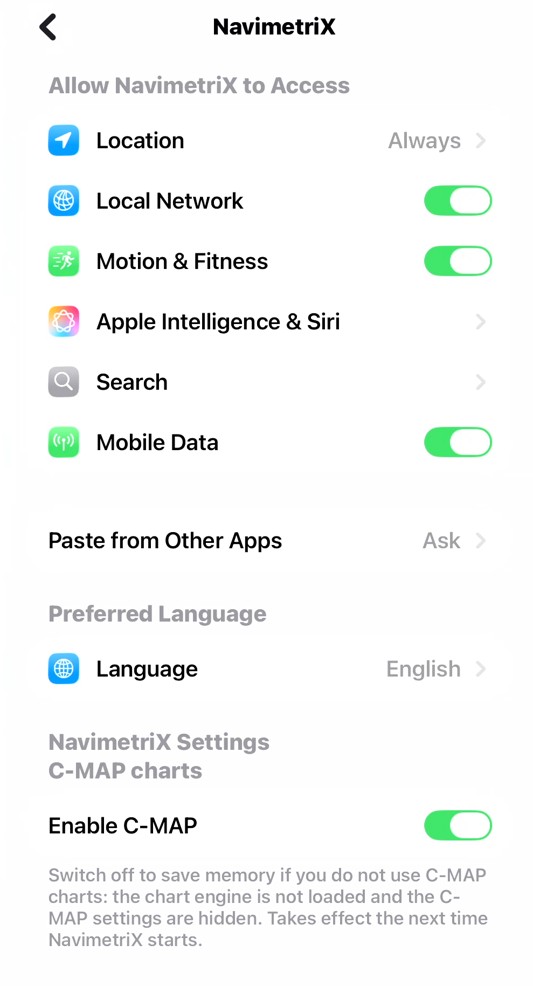 iPad Settings, NavimetriX page: “C-MAP charts” group with the “Enable C-MAP” switch and its explanatory text