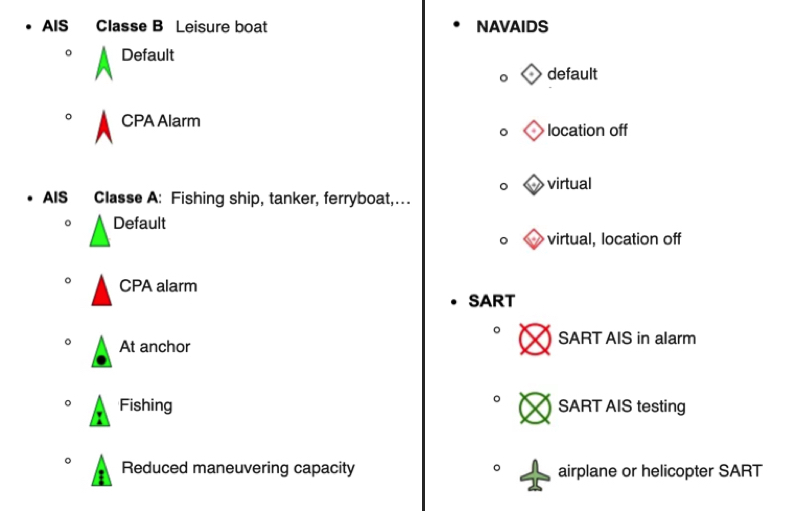
You can display several types of icons on the chart: AIS targets, navigation aids (NavAids), SART (Search And Rescue) distress beacons, AIS targets over the Internet, and “in-situ” weather data stations.
AIS Targets, NavAids, SART
AIS Target over Internet
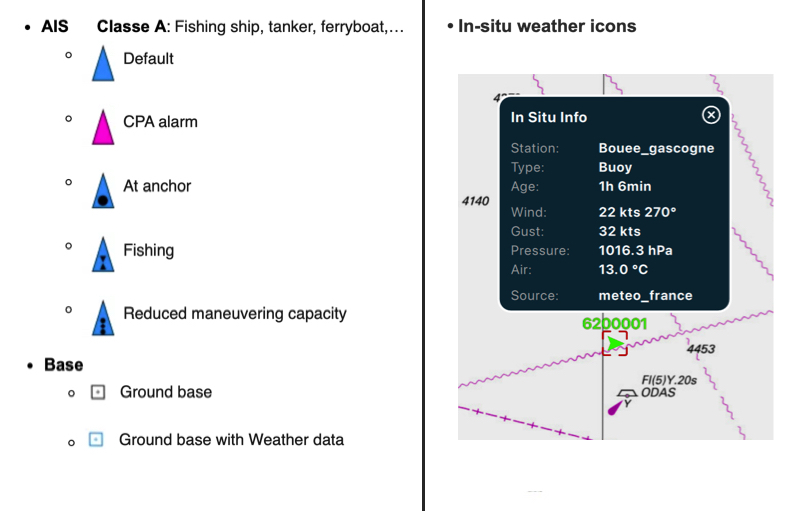
- AIS targets over Internet are blue; those received by your onboard receiver are green.
- A target in alarm (CPA/TCPA) is red, whether it comes from the Internet or from your receiver. In colour-blind mode, it uses an adapted icon.
- A vessel broadcasting weather (AIS message 8) is light blue.
- A base station or an aid to navigation broadcasting weather appears as a cyan square.
Weather station 'in-situ'
To know more, read our FAQ: How to display "in-situ" weather stations