Yes, with nothing else to install. The phone re-broadcasts its position on the boat's WiFi network, and the computer listens to it like any other NMEA link.
On the phone
Settings (chevron handle ‹ on the right edge of the screen), GPS & NMEA: set GPS source to Internal, then turn on Relay device GPS on local network. Note the Relay port (10111 by default). That is all: Advanced mode is not needed (if it is on, these settings are on the GPS tab).
On the computer
If the computer has no other link, stay on the standard page: turn the NMEA switch on, set NMEA Protocol to UDP, Server port to the phone's relay port, and GPS source to NMEA. With a single source there is nothing to arbitrate.
If it already receives the instruments from elsewhere, turn on Advanced mode to say which of the two links provides the position: tab GPS, GPS source on GPS (the link settings then appear), then protocol UDP and that same port.
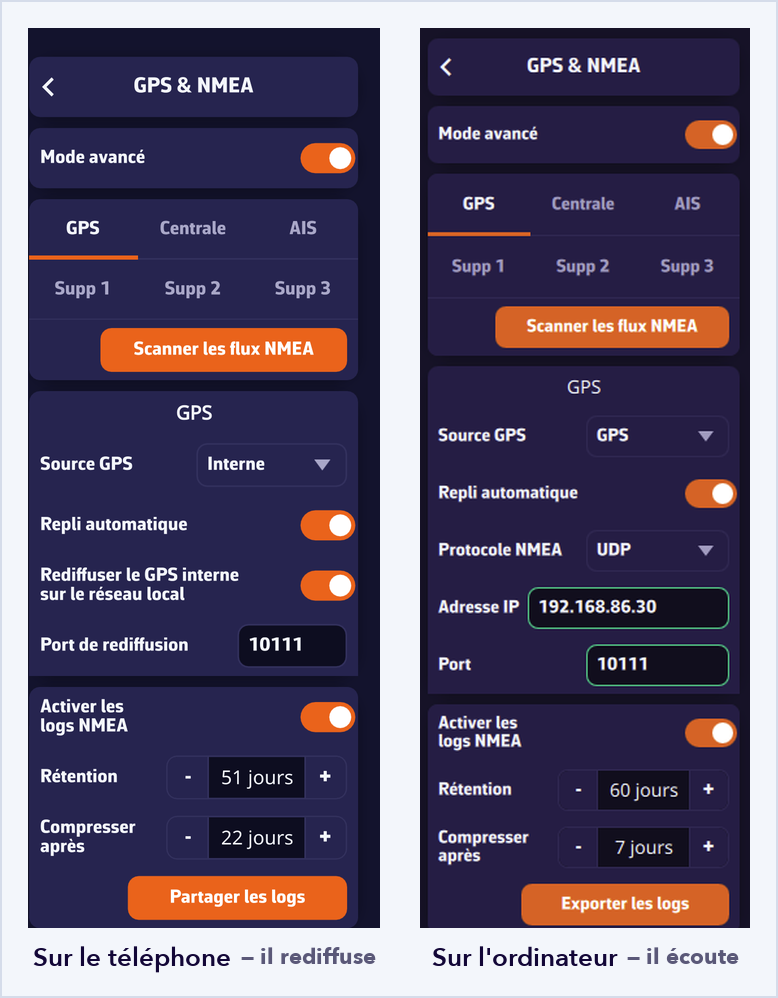
The computer then follows the phone's position while taking its instruments from the nav computer. If the phone shuts down or leaves the network, automatic fallback takes over.
Worth knowing
- Both devices must be on the same WiFi network: broadcast does not cross subnets, and some routers isolate their clients from one another.
- The app must stay open on the phone; screen off is fine.
- The position keeps the rate and the accuracy of a phone GPS, and this use drains the battery.
It works the other way round too: a computer wired to the nav computer can feed the tablets on board, which replaces a multiplexer in some installations.