The Navigation switch at the top of the left panel turns Navigation mode on and off. The goal is to keep mobile devices from draining their batteries when the navigation functions are not in use, such as when running routing simulations, analyzing weather data, etc.
Navigation mode is reserved for the Premium subscription.
Navigation Mode
Open the left panel by tapping the chevron handle (›) on the left edge of the screen: the Navigation switch is at the very top. When you turn it on, a window sums up what changes (high-precision GPS, track recording, active alarms, higher battery use) and offers to show the instruments and turn NMEA on.
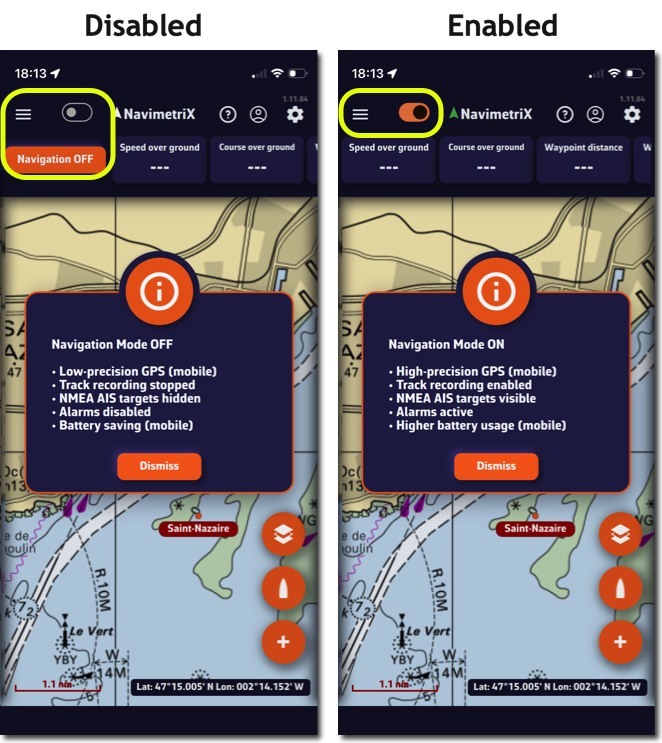
When Navigation mode is turned off, the GPS updates the position only every 30 seconds instead of every second. In Navigation mode, the Energy saving option (Settings > General) spaces updates to every 2 seconds.
Of course, don't forget to turn Navigation mode back on as soon as you set off.
GPS Accuracy Indicator
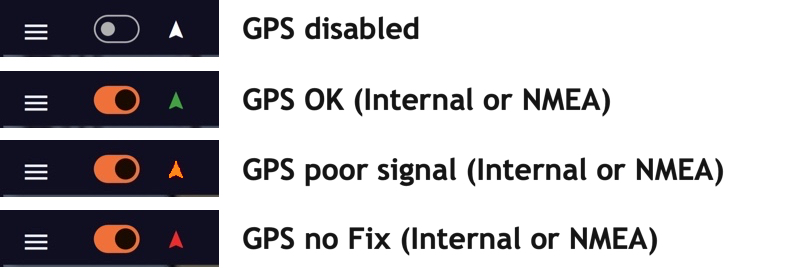
In Navigation mode, an arrow icon to the right of the Navigation label shows the GPS accuracy on every platform: green when the accuracy is 15 m or better, then increasingly orange and red up to 50 m, red with no position. In colour-blind mode, green is replaced by blue.
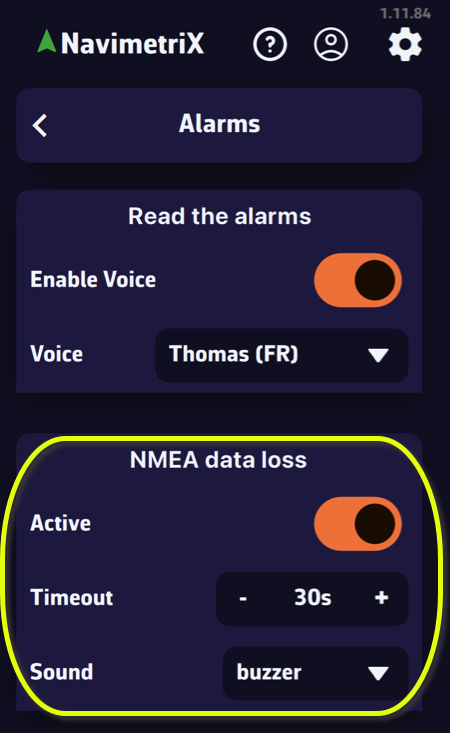
NMEA Data Loss Alarm
In Settings > Alarms, the NMEA data loss section warns you when NMEA data stops: Active switch, Timeout (10 to 300 s, 30 s by default) and Sound, a drop-down menu to choose the appropriate sound alarm.