Yes. On many boats the nav computer, the GPS and the AIS receiver are three separate boxes, each with its own WiFi or its own port. NavimetriX can now listen to them at the same time, with no multiplexer.
Open Settings (chevron handle ‹ on the right edge of the screen), section GPS & NMEA, and turn on Advanced mode. The page reorganises into six tabs.
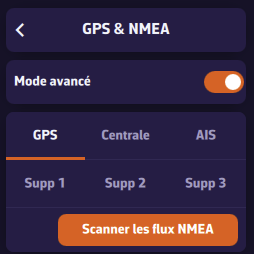
- GPS: a dedicated GPS, when the position does not come from the instruments.
- Instruments: wind, depth, log, heading, and often the position.
- AIS: a separate AIS receiver or transponder.
- Extra 1 to 3: everything else (barometer, MOB receiver, standalone sensor).
Each tab carries its own link, with its protocol, address and port. A link you do not use is declared by setting its NMEA Protocol to None.
The GPS and AIS tabs start with a selector. The GPS link settings only appear when GPS source is set to GPS; the AIS link settings, only when AIS source is set to Dedicated. Otherwise the tab only shows the selector: position or AIS then come through the instruments (or, for the position, from the device GPS).
AIS targets from every link are merged into a single list: whichever link a vessel arrives on, it appears once. Wind, depth and the other measurements are taken wherever they arrive.
If you know neither the addresses nor the ports, the Scan NMEA devices button searches for you and proposes a role for each stream it finds.
Advanced mode also adds a computation section:
- Speed reference: Surface (log speed, the default) or Ground (GPS speed, when the paddlewheel is fouled). It is used to compute true wind, VMG and polar performance.
- True wind: Computed by NavimetriX (the default) from apparent wind, or taken from the Instruments when they send it.
Note: going back to standard mode does not merely hide the other tabs, it shuts those links down. Their settings are kept and come back as soon as advanced mode is switched on again.