Laylines are automatically displayed when you have activated a POI using the Goto function and you need to tack or jibe to reach your target, upwind or downwind.
This requires:
- Navigation mode turned on (switch at the top of the left panel);
- a moving boat (speed over ground above zero) getting closer to the waypoint (positive VMC): when sailing away from the target, the laylines disappear;
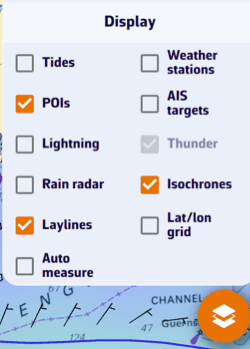
- the Laylines box checked in the layers menu (see below).
Definition
The layline is an ideal course on the water for reaching targets: marks or waypoints. It is an imaginary line that varies depending on the wind, current, and the sailboat's ability to sail upwind or downwind, as determined by its speed polar curve. The layline starts from the target, upwind or downwind, to indicate the course to follow and the point at which a boat must tack or jibe in order to reach the target as quickly as possible.
How it works
By convention, the green layline is the starboard tack, and the red layline is the port tack.
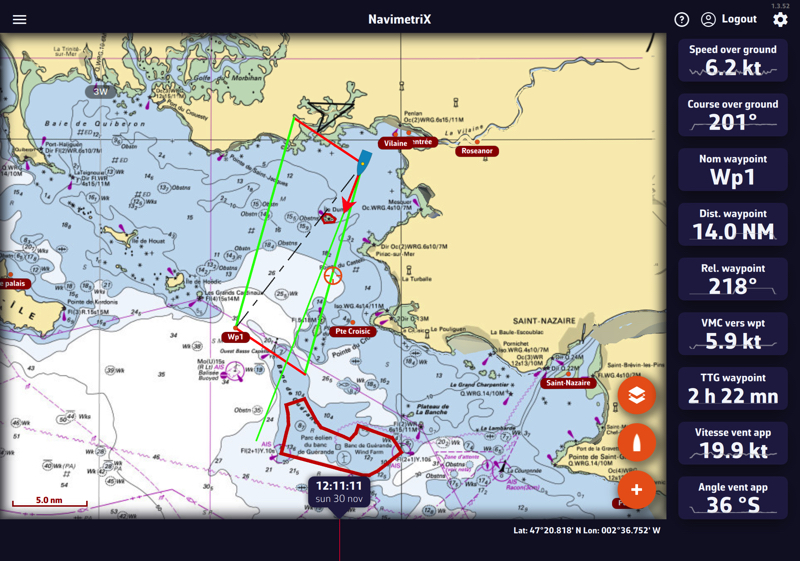
Following this guideline, the distance to be covered by following the best VMG (VMG Max), upwind or downwind, is the same; it is the optimal distance to be covered. If you move outside the laylines, the distance to be covered increases; if you sail within the layline, performance decreases. The angle and heading values vary dynamically with changes in the apparent wind speed and direction.
You can activate the instruments corresponding to the layline data:
- Distance to layline: length of the layline before tacking
- Time to layline: duration of the layline before tacking
Display
Layline display can be enabled/disabled with the Laylines box in the Display section of the layers menu (round orange layers button, bottom right of the chart):