You can send NMEA data to instruments to:
- Control an autopilot by activating navigation to a waypoint (APB, BOD, BWC, RMB, XTE, WPL, RTE sentences).
- Send data from your device's internal sensors (1) to external repeaters (position: RMC, GLL, GGA, VTG; barometer: XDR / MDA).
- Send data to NKE instruments (Multigraphic and Gyrographic) and to PIXEL displays.
Open Settings by tapping the chevron handle (‹) on the right edge of the screen, select GPS & NMEA, then the NMEA Outputs sub-page at the bottom of the page, below the logs. Under each sentence, a short description says what it carries.
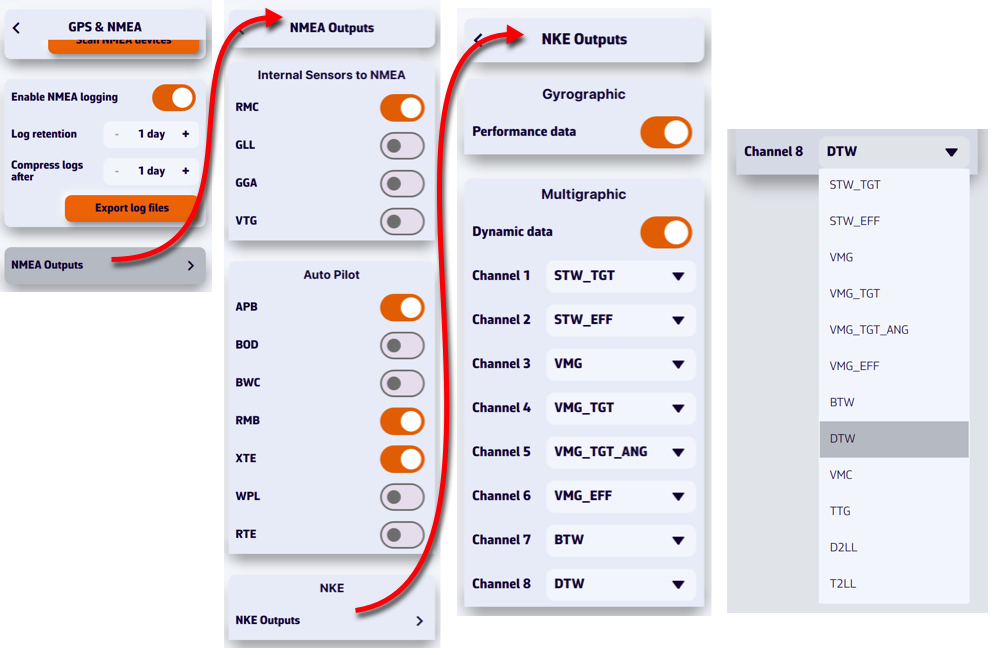
The NMEA switch on the GPS & NMEA page must be on: sentences go out through the configured link. In order to be received by your instruments, they must be transmitted via a bidirectional gateway or multiplexer, usually via Wi-Fi, but also via USB. To be processed, you must first check the sentences accepted by your instruments in their user manual (autopilot, chartplotter, repeater, etc.).
For NKE instruments (NKE Outputs), you can feed each of the 8 dynamic channels of the NKE Multigraphic by choosing a value in each channel's menu (target speed, VMG, waypoint distance and bearing, distance and time to layline…), and send performance data to the Gyrographic.
PIXEL Outputs sends performance, waypoint and current data to a PIXEL display at the IP address you enter.
(1) Depending on the device, mainly smartphones and tablets, the sensors sent may include:
- Built-in GPS.
- Electronic barometer (the XDR / MDA row only appears if the device has one).