USB-connected GPS devices, also known as GPS mice, are supported by NavimetriX on computers (macOS, Windows and Linux). NavimetriX reads the NMEA sentences the GPS sends on its serial port directly.
Phones and tablets have no serial port: the SERIAL choice is greyed out there.
Prerequisites
A driver matching the connected device must be installed in the operating system beforehand. These are usually Prolific or FTDI drivers, depending on the type of device connected.
NMEA is a Premium subscription feature.
Setup
Open Settings by tapping the chevron handle (‹) on the right edge of the screen, then select GPS & NMEA.
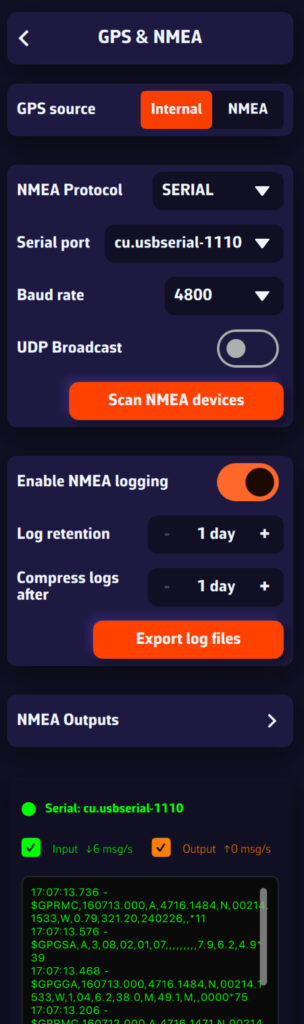
Select:
- GPS source = NMEA
- NMEA switch = on
- NMEA Protocol = SERIAL
- Serial port = open the menu and select the GPS port (COM3, COM4… on Windows; cu.usbserial… on a Mac).
- Baud rate = the one given in the GPS manual. The menu offers 4800, 9600, 38400 and 115200; the default is 9600, and many NMEA 0183 GPS units transmit at 4800.
Important: do not leave GPS source on Internal. With Internal, NavimetriX uses the position supplied by the system's location service and ignores the USB GPS. On a Mac, this internal position is never used for the boat in Navigation mode.
Simpler: press Scan NMEA devices, then Start Scan. On a computer, the scan tries each serial port at 9600, 4800, 38400 and 115200 baud. Then press Apply settings: NavimetriX sets the port, the baud rate and the GPS source, and turns the NMEA switch on.
The incoming sentences should scroll in the Incoming NMEA sentences console at the very bottom of the page.
In Advanced mode, you can also connect the GPS on its own link: GPS tab, GPS source = GPS, then the same protocol, port and baud rate settings.
Bluetooth GPS on Windows
Once paired, a Bluetooth GPS appears in Windows as a COM port ("Standard Serial over Bluetooth link"). The settings are the same: GPS source = NMEA, NMEA switch on, NMEA Protocol = SERIAL and that COM port. See How do I connect a Bluetooth GPS with Windows 11?
Tip: if the serial port does not work, open the drop-down menu and check whether another port is available. If no port is available, the driver is probably not the right one. If the port opens but nothing scrolls, try another baud rate.