A working folder groups everything that belongs to one project, a cruise, a regatta, a sailing area: its GRIBs, POIs, ZOIs, routes, routings and tracks. Only one folder is active at a time, and the lists and the chart show nothing else.
Switching folders
The Working folder bar, above the tabs of the side panel, shows the current folder. Tap it to open the list of your folders:
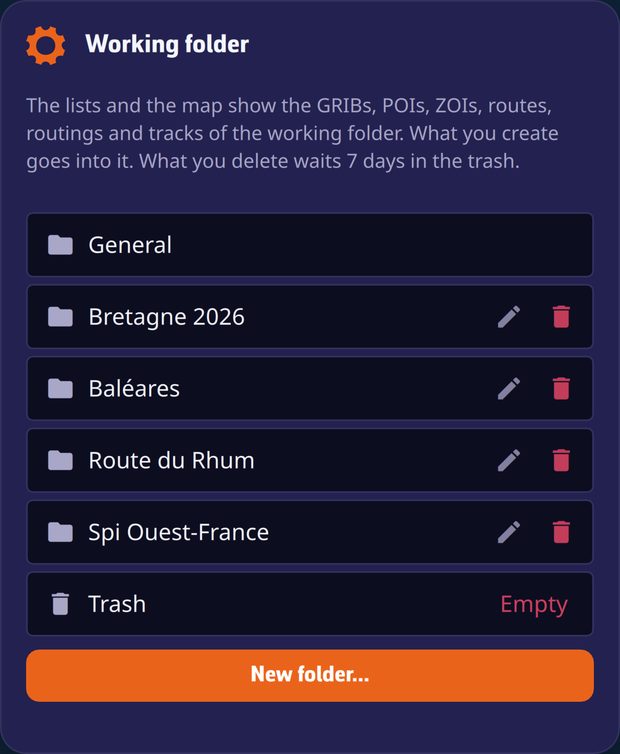
- tap a folder to work in it: the six lists and the chart switch together;
- New folder… creates a folder and opens it straight away;
- the pencil renames a folder, the bin deletes it.
The General folder is the default one: it holds everything you have not filed elsewhere. It cannot be renamed or deleted.
What the current folder changes
- everything you create or import (POI, route, ZOI, GRIB, routing, recorded track) goes into the current folder;
- the chart only draws the items of the current folder. The route you are following stays displayed, whatever the folder;
- a routing only takes the ZOIs of the current folder into account;
- only the GRIBs of the current folder are updated. When you enter a folder, the app checks whether a newer run is available for its GRIBs.
Moving or duplicating to another folder
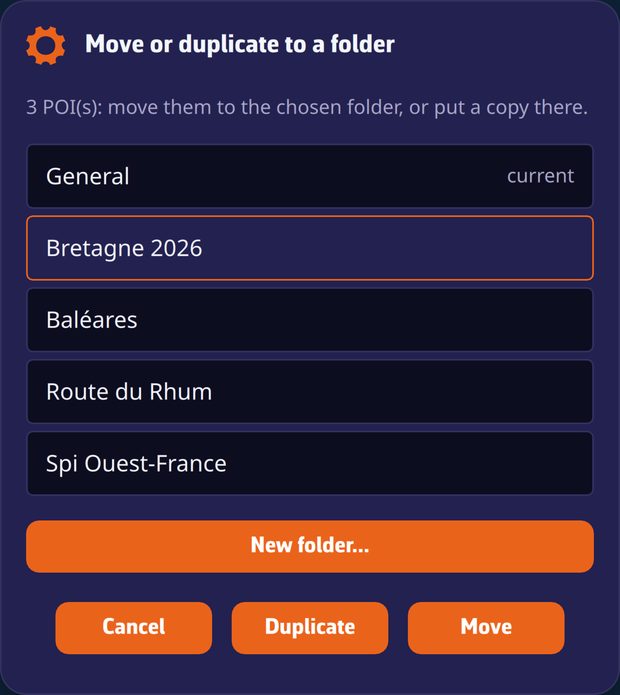
- for one item: ⋮ menu of the row > Folder…, then pick the destination folder;
- for several items: tick them, then tap the Folder button of the action bar;
- POIs, routes and ZOIs can be moved or duplicated: a copy is handy for an anchorage or an avoidance zone used by several projects. GRIBs, routings and tracks can only be moved.
Deleting, and the trash
What you delete in a list or on the map goes to the Trash, the last row of the “Working folder” window. Deleting a folder sends all its contents there.
- the trash opens like a folder: ⋮ > Folder… puts an item back in the folder of your choice;
- in the trash, Delete erases for good;
- what has been waiting there for 7 days is deleted for good, and the Empty button, on the “Trash” row, erases all its contents at once.
What about my other devices?
The folders and their contents follow your account: create a folder on the computer, it is on the tablet. The current folder, however, belongs to each device: you can prepare the next cruise on the computer while the tablet on board stays on today's sail.
The former track archive folders have become working folders: you will find them in the list, with the tracks you had filed in them.