How to synchronise?
In order for NavimetriX to be synchronised across two or more devices, you must:
- Have subscribed to the Premium option and created a NavimetriX account
- Have devices connected to the Internet (Wi-Fi, cellular or satellite).
- Be logged into the same NavimetriX account on all devices
Which items are synchronised and which are not?
Most settings are synchronised, with a few exceptions, namely:
Synchronised
- All application settings, except those specific to each device:
- The Theme (Light, Dark, Night)
- In Settings > General: Language, Starry sky, Display scale, Font (Windows), Timeline scale and Energy saving
- The Instruments configuration (which must be fitted to screen sizes)
- In GPS & NMEA: the NMEA connections, GPS source, AIS source, Speed reference, True wind, the device pressure sensor, relays on the local network, NMEA Outputs and Remote cockpit
- In Settings > Alarms: the voice that reads the alarms (Enable Voice, Voice)
- With no exception
- POIs, ZOIs, routes, routings, routing tables, statistics, AI briefing, input data
- The tracks of your navigations and the logbook: they are sent to your account as soon as the device has Internet access, then appear in the Tracks tab of the other devices
- Screen display of charts, GRIBs, POIs, tides, AIS targets, routing isochrones
Partially synchronised
- GRIBs files


Downloaded GRIB files appear in the GRIB list on all devices. When a GRIB is downloaded or updated on a device, it is followed by a dimmed refresh icon. If a new run is available for that GRIB, this icon is activated.

On other device(s), the list of downloaded GRIBs is displayed, but the GRIBs that are not on the device are marked "Missing" and followed by an activated download icon. The contents of the GRIBs must then be downloaded manually.
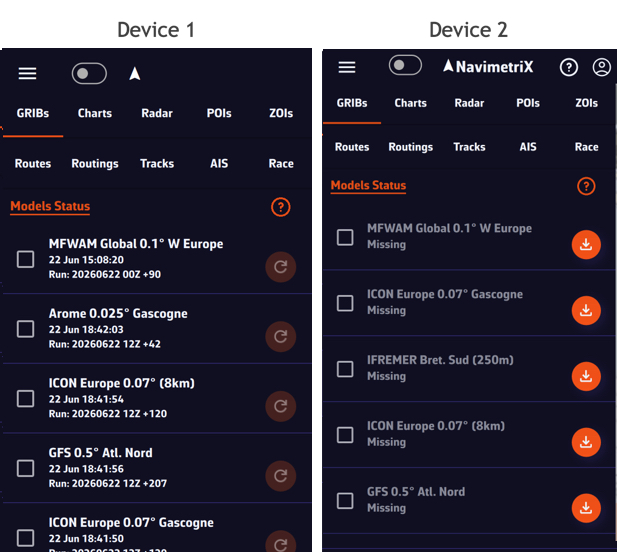
Once the GRIBs are identical on all devices, the download icon is replaced by the refresh icon.
- Geogarage charts
The Geogarage account is synchronised across all devices.
Geogarage charting is not synchronised: charts must be downloaded to each device.
- C-MAP charts
C-MAP charts are not synchronised: each device registers with your C-MAP account (Settings > C-MAP charts > "Register this device") and downloads its own areas.